
For most teams building user-facing product or site search, Algolia is the faster path to production. If you need deep analytics, custom text analysis pipelines, or want to avoid per-query pricing at scale, Elasticsearch is the stronger long-term choice.
Choose Algolia if you need instant search live within days, your team lacks dedicated search or DevOps engineers, or you’re running an e-commerce catalog where merchandising and A/B testing matter as much as raw query performance.
Choose Elasticsearch or Elastic Cloud if you need full control over analyzers and aggregations, you’re running log analytics or observability workloads alongside search, or your query volume is high enough that per-search billing can become a significant budget consideration.
Consider a hybrid or managed approach if you want Elasticsearch’s flexibility without the cluster management burden. Elastic Cloud gives you managed Elasticsearch with regional deployment options, sitting between Algolia’s convenience and self-hosted complexity.
The core trade-off is simple: Algolia charges for convenience; Elasticsearch charges in engineering hours.
Table of Contents
- What are Algolia and Elasticsearch, exactly?
- Algolia vs Elasticsearch: side-by-side comparison
- How do relevancy, ranking, and query capabilities actually differ?
- What questions should you ask before choosing?
- What should you know before migrating between them?
- What does total cost of ownership actually look like?
- Key Takeaways
- The case for picking boring over clever
- Search implementation without the ops overhead
- Useful sources
- FAQ
What are Algolia and Elasticsearch, exactly?
Algolia is a managed, search-as-a-service platform built for user-facing search experiences. You push records via API, configure ranking rules in a dashboard or code, and Algolia handles infrastructure, replication, and uptime. According to APIScout, Algolia targets sub-100ms latency for typical queries and backs enterprise plans with a 99.999% SLA. Pricing runs per record stored and per search request.
Elasticsearch is an open-source, Lucene-based search and analytics engine. You can self-host it on your own infrastructure or run it on Elastic Cloud, the vendor’s managed offering. It handles everything from full-text search to log aggregation and time-series analytics, but production clusters require shard management, JVM tuning, and ongoing DevOps attention.
Elastic Cloud sits in the middle: managed Elasticsearch with regional deployments, removing cluster operations from your plate while preserving the full Query DSL and analytics capabilities.
Primary use cases at a glance:
- Algolia: e-commerce product search, site search, documentation search, in-app instant search, autocomplete
- Elasticsearch: log and event analytics, observability pipelines, enterprise full-text search, custom NLP pipelines, hybrid search at scale
Algolia vs Elasticsearch: side-by-side comparison
| Dimension | Algolia | Elasticsearch / Elastic Cloud |
|---|---|---|
| Best for | User-facing instant search, e-commerce, docs | Analytics, logs, custom pipelines, enterprise search |
| Speed / latency | Sub-100ms by design; architecture optimized for UX | Fast at scale, but latency depends on cluster sizing and query complexity |
| Relevancy & customization | Ranking rules, dynamic re-ranking, typo tolerance out of the box | Full Query DSL, custom analyzers, script scoring — deeper but requires tuning |
| Scaling & ops | Fully managed; zero cluster ops | Self-host: high ops burden; Elastic Cloud: reduced but not zero |
| Pricing / TCO | Per record + per search; predictable at low volume, expensive at high volume | Infrastructure cost + engineering labor; lower unit cost at scale |
| Integration & SDKs | Official SDKs for most languages, e-commerce connectors, InstantSearch UI libraries | REST API, official clients, broad ecosystem; more integration work required |
| Security & compliance | SOC 2, GDPR, EU-region tenancy available | SOC 2, GDPR, regional deployments on Elastic Cloud; self-host gives full data control |
| Hosting / deployment | SaaS only (multi-region) | Self-host, Elastic Cloud, or hybrid |
| Vector / semantic search | NeuralSearch (hybrid keyword + vector) | ELSER and dense vector fields; mature vector support |
The single biggest trade-off is cost versus operational control. RayoSearch’s 2026 comparison puts it plainly: Algolia wins on developer experience and time-to-value; Elasticsearch wins when you need aggregations, custom analyzers, or want to avoid per-query billing at scale.
Latency note: Algolia’s architecture is purpose-built for sub-100ms query responses, making it a strong default for any experience where search-as-you-type UX is non-negotiable.
Small product teams and e-commerce managers without search engineers should default to Algolia. Engineering teams running analytics workloads or expecting millions of monthly searches should model the TCO before committing, as Algolia’s managed Grow plan at multiple millions of searches can exceed $4,000+/month, while equivalent self-hosted Elasticsearch infrastructure often runs in the low hundreds to low thousands depending on configuration.
How do relevancy, ranking, and query capabilities actually differ?
Algolia gives you faster relevancy improvements out of the box. Elasticsearch gives you deeper control, but you earn it through configuration.
Ranking rules and typo tolerance
Algolia’s ranking formula applies a tiered cascade by default: exact matches rank above typo matches, which rank above partial matches. Typo tolerance uses Levenshtein distance to allow one or two character edits depending on word length, and it’s on by default. You tune it through a dashboard or a single API call. For most product catalogs, this produces good relevancy with minimal effort.
Elasticsearch’s approach is more surgical. You define custom analyzers, tokenizers, and token filters at index creation time. A custom analyzer with an edge_ngram tokenizer handles autocomplete; a synonym filter handles vocabulary expansion. Script scoring lets you inject business logic directly into the ranking function. That power is real, but a misconfigured analyzer silently degrades relevancy in ways that are hard to debug without production-scale query logs.
Query DSL vs API simplicity
An Algolia relevancy tweak looks like this conceptually:
{
  "customRanking": ["desc(popularity)", "asc(price)"],
  "optionalWords": ["the", "a"]
}
The equivalent Elasticsearch configuration involves a function_score query wrapping a bool query with should clauses, field boosts, and a decay function. It’s expressive, but a junior engineer can break relevancy in an afternoon.
Algolia also ships built-in merchandising dashboards, A/B testing, and personalization that product managers can use without touching code. Elasticsearch has no equivalent out of the box.
Pro Tip: Test relevancy changes against a sample of your actual production query distribution, not synthetic test queries. The top 50 queries by volume often expose edge cases that clean test sets miss entirely.
What questions should you ask before choosing?
The single most important question: does your team have dedicated search or DevOps engineers, and do you actually need the control that Elasticsearch provides?
- What is your team’s ops capacity? — If no one owns cluster health, shard rebalancing, and JVM heap tuning, self-hosted Elasticsearch will cost you more in engineering time than Algolia’s subscription.
- Do you have data residency or compliance requirements? Both Algolia and Elastic Cloud offer EU-region tenancy. For regulated industries, confirm data residency options during procurement — self-hosted Elasticsearch gives you the most control over where data lives.
- What is your expected monthly search volume? — At low-to-moderate volumes, Algolia’s per-search pricing is predictable. At very high numbers of searches per month, that billing model can become quite expensive, per APIScout’s analysis — a cost that often funds a full-time engineer to run self-hosted infrastructure instead.
Red flags to watch:
- Choosing Algolia for a 50-million-record catalog without modeling the per-record cost first
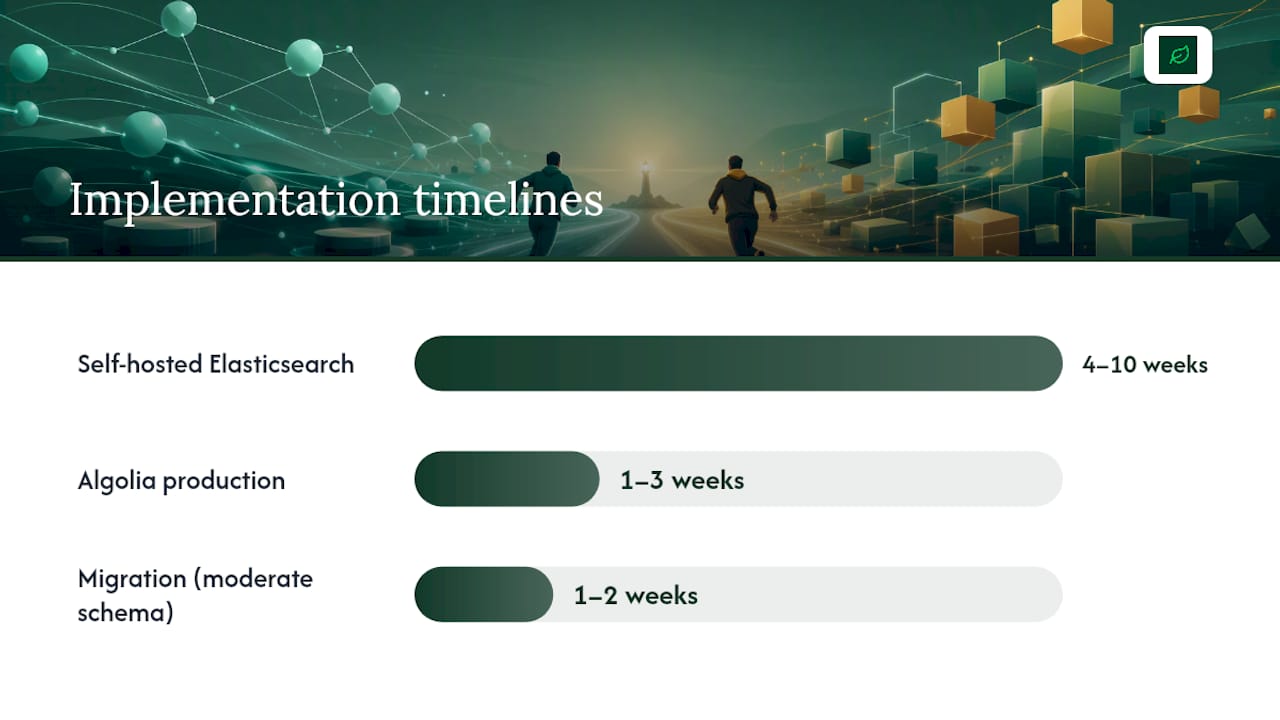
Timeline estimates: A minimal Algolia production implementation typically takes 1–3 weeks. A self-hosted Elasticsearch cluster, properly sized and secured, runs 4–10 weeks depending on schema complexity and compliance requirements. Migration between the two can take 1–2 weeks for moderate schemas with good tooling.
For teams considering a PostgreSQL-backed hybrid approach (storing embeddings in the database and using pgvector for semantic search), that’s worth evaluating when your search needs are narrow and you want to avoid a dedicated search service entirely.
What should you know before migrating between them?
The biggest migration risk is relevancy regression, not data transfer. Your new index can be technically correct and still return worse results than the old one.
The practical migration sequence runs like this: export your existing documents or records, transform them into the target data model (Elasticsearch mappings or Algolia record schemas), set up incremental sync so the source stays live during migration, run A/B relevance tests against production query logs, and keep a fallback routing rule in place until the new index passes your quality bar.
Common gotchas:
- Tokenization differences — Elasticsearch’s analyzers and Algolia’s tokenizer behave differently on hyphenated terms, accented characters, and compound words. Test edge cases from your actual catalog before cutover.
- Rate-limited indexing costs — Algolia’s indexing operations count against your plan limits. Bulk migrations can trigger overage charges if not batched carefully.
Testing guidance: Define a minimum relevancy threshold before you start (e.g., top-5 precision on your 100 highest-volume queries). Run both indexes in parallel, compare results on that query set, and don’t cut over until the new index meets or exceeds the threshold. Build a rollback routing rule at the API gateway or load balancer level so you can revert in minutes, not hours.
What does total cost of ownership actually look like?
Algolia costs more at low volume for the convenience it provides. Elasticsearch costs less in infrastructure at scale but adds engineering labor that rarely appears in the initial budget.
| Scenario | Algolia (est. monthly) | Elasticsearch self-hosted (est. monthly) | Key assumption |
|---|---|---|---|
| Small e-commerce | Typically in the low hundreds of dollars | Typically in the low hundreds of dollars | Shared DevOps; single-node or small cluster |
| Mid-market catalog (5M searches, 1M records) | Can exceed $4,000+/month | Typically in the low thousands of dollars | Dedicated search engineer part-time |
| High-traffic enterprise (50M+ searches, 5M+ records) | Custom pricing (often significantly higher at this scale) | Low thousands to several thousands depending on configuration | Full-time search/DevOps engineer required |
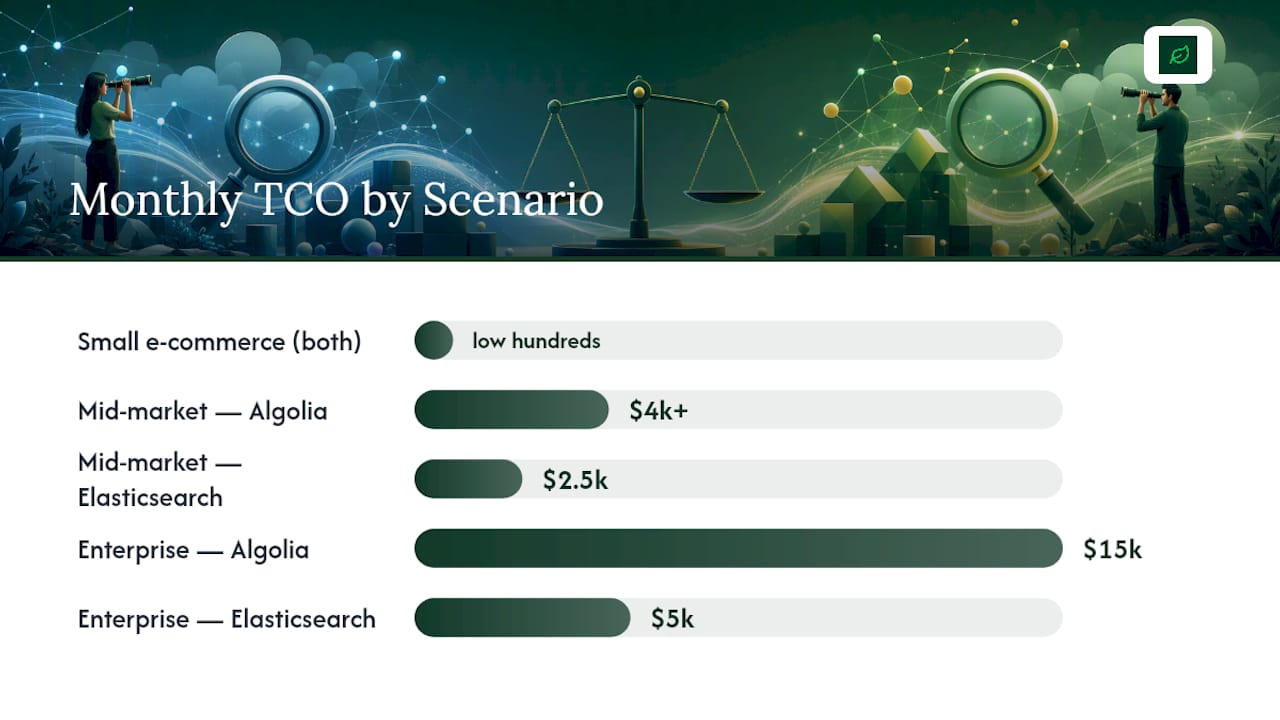
Figures are illustrative estimates based on published pricing structures and APIScout’s scenario analysis. Your actual costs depend on record size, query complexity, replication factor, and cloud region.
Methodology: Algolia estimates use the Grow/Premium tier per-record and per-search rates. Elasticsearch infrastructure estimates assume AWS or GCP compute for appropriately sized clusters. Engineering labor is estimated at a blended rate and represents the ongoing ops burden, not one-time setup.
The math typically flips in favor of self-hosted Elasticsearch or Elastic Cloud when monthly searches exceed 5 million and you have at least one engineer who can own cluster health. Below that threshold, or without that engineer, Algolia’s total cost is usually lower when you factor in the time you’re not spending on ops, as at scale Algolia pricing may be an order of magnitude higher than Elasticsearch infra cost.
Key Takeaways
Algolia is the right default for user-facing search when your team lacks dedicated search engineers; Elasticsearch wins when you need analytics, custom analyzers, or want to escape per-query pricing at scale.
| Point | Details |
|---|---|
| Default to Algolia for UX search | Managed SaaS with sub-100ms latency and zero cluster ops suits most product and e-commerce teams. |
| Elasticsearch pays off at scale | Self-hosted infrastructure costs are lower at millions of searches per month, but require dedicated engineering. |
| TCO flips around 5M searches/month | Below that threshold, Algolia’s all-in cost is usually lower once engineering labor is counted. |
| Migration risk is relevancy, not data | Run A/B relevance tests against production query logs before cutting over to a new index. |
| Cannatract handles implementation end-to-end | Cannatract builds and migrates search systems in 2–4 weeks with a fixed quote and compliance support. |
The case for picking boring over clever
There’s a pattern worth naming in search implementation projects: teams consistently underestimate how long it takes to make Elasticsearch good, not just running. Getting a cluster live is a two-day task. Getting relevancy right for a real product catalog, with real query distributions and real edge cases, is a two-month project if you’re honest about it.
Algolia’s out-of-the-box ranking formula is genuinely well-designed. For most e-commerce and in-product search use cases, it produces better day-one relevancy than a freshly configured Elasticsearch index with default settings. That’s not a knock on Elasticsearch — it’s a reflection of how much tuning work Algolia has already done for you.
The teams that regret choosing Elasticsearch aren’t the ones who needed its power. They’re the ones who chose it because it felt more “serious” or because the open-source licensing looked cheaper on a spreadsheet. If you don’t have a search engineer who genuinely wants to own analyzer configuration and cluster health, you’re not getting Elasticsearch’s upside — you’re just getting its complexity.
Conversely, the teams that regret Algolia are almost always the ones who hit the pricing wall at scale and didn’t model it in advance. At 50 million searches a month, Algolia’s per-query cost can become a major budget factor and often funds a full-time engineer for self-hosted Elasticsearch.
Pick the tool that matches your team’s actual capacity, not your team’s aspirational capacity. That’s the honest version of this decision.
Search implementation without the ops overhead
If you’ve read this far and the honest answer is “we don’t have a search engineer and we don’t want to become one,” that’s exactly the situation Cannatract is built for. Cannatract’s web development and e-commerce services cover search implementation, migration, and performance tuning as part of a complete build — not as a bolt-on.
A typical engagement runs 2–4 weeks, starts with a scoping call to map your current data model and query patterns, and ends with a production-ready search system and documentation your team can own. Fixed quote up front, no retainer required to get started. For regulated industries, Cannatract handles data residency requirements and compliance documentation as part of the build scope.
Book a free automation audit at cannatract.co to get a clear picture of what implementation actually costs for your catalog size and traffic profile.
Useful sources
- Algolia vs Elasticsearch: Search API Showdown 2026 | APIScout
- Algolia vs Elasticsearch vs Azure AI Search — 2026 In-Depth Comparison — RayoSearch
- Algolia vs Elasticsearch — Better in Europe
- How fast is Algolia?
- Algolia vs Elasticsearch
- Meilisearch vs Algolia - Meilisearch Documentation
- Levenshtein distance — Wikipedia
- PostgreSQL
FAQ
Do people still use Elasticsearch?
Yes — Elasticsearch remains one of the most widely deployed search and analytics engines in production. It’s the backbone of observability stacks, enterprise log pipelines, and large-scale full-text search systems at companies including Netflix.
How is Algolia so fast?
Algolia’s architecture stores search indexes in RAM rather than on disk, distributes them across a global CDN-like network of data centers, and pre-computes ranking signals at index time rather than query time. This design, documented by Algolia’s support team, is what produces sub-100ms responses for most user-facing queries.
Does Netflix use Elasticsearch?
Netflix has publicly documented using Elasticsearch for log analytics, observability, and internal search workloads — exactly the use case where Elasticsearch’s aggregation and analytics capabilities outperform managed search-as-a-service options like Algolia.
Who are Algolia’s main competitors?
Algolia’s closest competitors in the managed search-as-a-service space include Elasticsearch via Elastic Cloud, as well as other managed search platforms. For teams evaluating the full field, RayoSearch’s 2026 comparison covers the major options including Azure AI Search.
Can Cannatract help with search implementation or migration?
Yes. Cannatract builds and migrates search systems as part of its web development and e-commerce engagements, typically delivering a production-ready implementation in 2–4 weeks with a fixed upfront quote and compliance support for regulated industries.