TL;DR:
- Zendesk is ideal for enterprise support teams managing high ticket volumes and multiple brands.
- Intercom suits product-led teams needing real-time in-app messaging and autonomous AI resolution capabilities.
Zendesk is the right call for ticket-heavy enterprise operations; Intercom wins for product-led teams that need real-time, in-app conversational engagement. The core difference is architectural: Zendesk organizes support around structured tickets, SLAs, and macros, while Intercom organizes it around ongoing conversations and in-product messaging. That distinction drives every trade-off in cost, configuration time, and day-to-day workflow. Small teams with straightforward email and chat needs should pilot Intercom first. Mid-market SaaS or product-led teams benefit most from Intercom’s messenger and Fin AI agent. Enterprise operations handling high ticket volumes across multiple brands or countries should evaluate Zendesk, budgeting 2–4 months for configuration.
Table of Contents
- How do Zendesk and Intercom compare side by side?
- What feature differences actually matter for your operations?
- What does each platform actually cost, including hidden fees?
- How do you choose? A practical checklist and red flags
- What does migration and implementation actually look like?
- Why do many teams run both platforms at the same time?
- Key Takeaways
- The real cost of getting this decision wrong
- Cannatract builds the integration layer so your team doesn’t have to
- Useful sources
- FAQ
How do Zendesk and Intercom compare side by side?
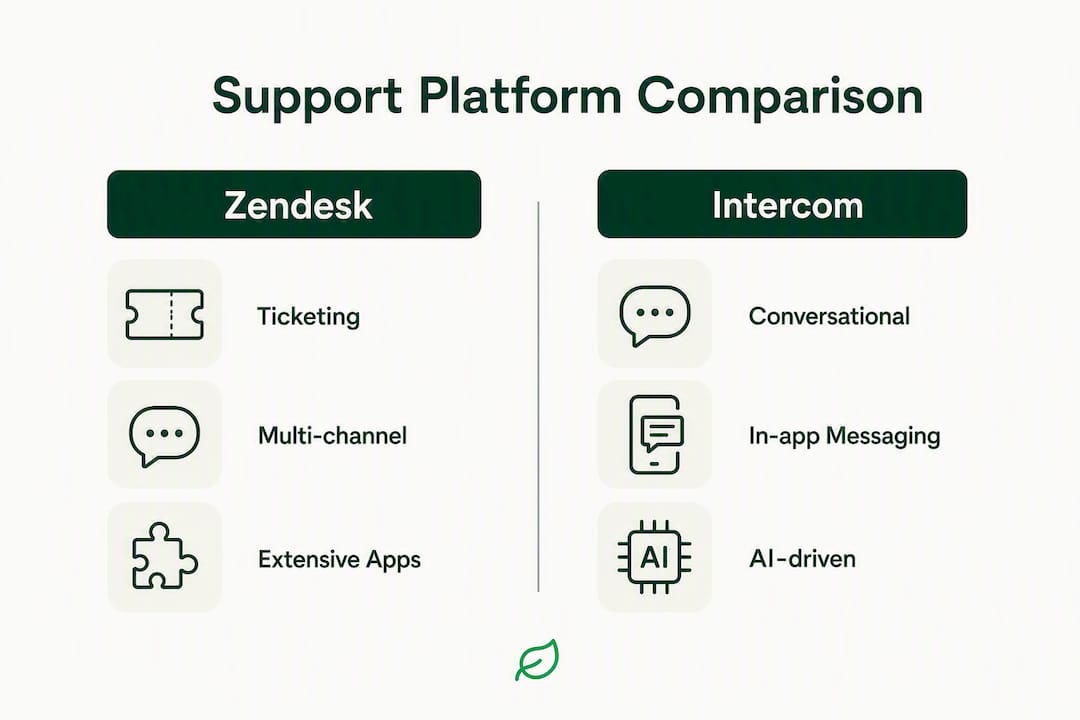
| Dimension | Zendesk | Intercom |
|---|---|---|
| Best for | Enterprise, multi-brand, high-volume ops | SaaS, product-led, in-app engagement |
| Core model | Ticket-centric | Conversation-first |
| Channels | Email, chat, voice, social, in-app | Chat, email, in-app, limited voice |
| Automation & AI | Copilot-style AI, macros, routing | Fin AI agent, per-resolution pricing |
| Integrations | ~1,800 apps | ~450 apps |
| Pricing model | Per agent/seat | Per seat + per-resolution AI |
| Implementation | 2–4 months (enterprise) | 1 day (basic) to weeks (full) |
| Scalability | Strong: multi-brand, SLAs, telephony | Strong for SaaS; less so for complex ops |
| Reporting | Deep, customizable | Good; BI tools needed for advanced use |
| Security & compliance | SOC 2, HIPAA, GDPR | SOC 2, GDPR |
Hidden cost alert: Zendesk’s configuration tax (admin time, middleware, consultants) adds real budget overhead. Intercom’s per-resolution AI pricing can balloon at scale if you don’t model consumption before signing.
What feature differences actually matter for your operations?
Ticketing vs. conversation architecture
Zendesk structures every customer interaction as a ticket with a status, assignee, SLA timer, and audit trail. That model works well for ops teams that need accountability, escalation paths, and compliance records. Intercom treats support as a thread of messages tied to a user profile, which gives product teams richer behavioral context but fewer formal workflow controls.

Macros and triggers in Zendesk let you automate repetitive responses and routing at scale. Intercom’s workflows are more visual and faster to configure, but they’re built around conversation events rather than ticket states.
Channels and where each platform leads
Zendesk covers email, live chat, voice/telephony, social (Twitter/X, Facebook), and in-app. Its native voice capabilities are a genuine differentiator for enterprise teams running contact centers. Intercom’s strength is the in-product messenger and proactive outbound messaging; voice is available but not a core strength.
Automation and AI
Intercom’s Fin AI agent reports materially higher autonomous resolution rates in some independent benchmarks, and it prices at roughly $0.99 per resolution with volume minimums. Zendesk’s AI leans toward copilot-style assistance, helping agents draft replies rather than fully resolving tickets autonomously. Industry benchmarks put median tier-1 AI deflection around 41%, with top-quartile performers reaching ~59%. Neither vendor’s marketing claims should be taken at face value without a pilot.

Pro Tip: Ask both vendors for a sample consumption model using your actual monthly ticket volume before you sign. Per-resolution fees that look cheap at 500 tickets/month can become your largest line item at 10,000.
Reporting and integrations
Zendesk’s out-of-the-box dashboards cover most standard support metrics; deeper analysis usually requires Explore (its BI layer) or an external tool. Intercom’s reporting is solid for conversation and engagement metrics but leans on integrations for full operational visibility.
On integrations, Zendesk’s marketplace of roughly 1,800 apps dwarfs Intercom’s ~450. For e-commerce teams, neither platform natively performs in-ticket Shopify write-backs (refunds, order edits) without middleware. Commerce-native platforms handle that out of the box; Zendesk and Intercom both require custom connectors for those actions, which adds to your configuration overhead. If your support team processes order changes all day, that gap matters more than any AI feature comparison.
| Feature | Zendesk | Intercom |
|---|---|---|
| Native voice/telephony | Yes | Limited |
| Shopify order write-back | Middleware required | Middleware required |
| App marketplace | ~1,800 | ~450 |
| AI model | Copilot/assist | Autonomous (Fin) |
| SLA management | Native, advanced | Basic |
What does each platform actually cost, including hidden fees?
Zendesk uses per-agent seat pricing, which makes monthly costs predictable as long as your team size is stable. Intercom combines per-seat fees with Fin’s per-resolution consumption model. Per-seat pricing is easier to budget; per-resolution models require careful volume modeling because AI usage fees can overtake base seat costs at scale.
Common add-ons that inflate both platforms’ real cost:
- Advanced AI tiers — (Zendesk Advanced AI, Intercom Fin upgrades)
Model your AI costs before signing. Request a sample consumption model from vendors using your actual ticket volume. Per-resolution fees can quickly overtake per-seat fees at scale.
Enterprise Zendesk deployments often require a dedicated admin and sometimes an implementation consultant, adding $10,000–$50,000+ in professional services depending on complexity. Intercom’s lighter setup reduces that overhead significantly for smaller teams, though complex SaaS integrations still require engineering time.
How do you choose? A practical checklist and red flags
Work through these before your next vendor demo:
- List required channels — If voice is non-negotiable, Zendesk is the safer bet.
Questions to ask vendors during demos: What is the per-resolution price at my projected AI volume? How is historical ticket data exported if we migrate? What does a standard implementation timeline look like for a team our size? Who owns ongoing automation maintenance?
Red flags: Opaque consumption pricing with no sample model, no native SLA configuration on the tier you’re evaluating, and vague answers about migration support. If a vendor can’t show you a working Shopify order-action demo in-ticket, that gap is real.
What does migration and implementation actually look like?
Intercom can be live in a single day for basic messenger and workflow setups. A full Zendesk enterprise configuration typically takes 2–4 months, requires an admin owner, and often involves a consultant for teams above roughly 50 agents.
High-level migration steps for either platform:
- Audit your current automation logic (triggers, macros, routing rules).
- Map data fields and ticket/conversation history to the new schema.
- Rebuild automations manually in the new platform; they rarely port cleanly.
- Run a sandbox test with real scenarios before going live.
- Run both platforms in parallel for 2–4 weeks, routing a subset of volume to the new system.
- Export historical data from the old instance and keep it accessible for audit purposes rather than attempting a full automated migration.
Pro Tip: Never attempt a hard cutover on a Monday. Run parallel for at least two full business weeks, keep your SLA clocks running on the legacy system, and only cut over after your team has handled at least 200 real tickets in the new environment.
Why do many teams run both platforms at the same time?
Industry analysts commonly recommend using a ticket-centric platform as the operational backbone and a conversation-first tool for product engagement, rather than forcing one tool to cover both jobs. The pattern works like this: Intercom handles in-app onboarding messages, proactive outreach, and first-touch chat; qualifying conversations or unresolved issues route into Zendesk as structured tickets for SLA tracking and escalation.
Routing rules typically fire on conversation events (e.g., user submits a billing question) and create a Zendesk ticket via webhook or a native integration. The support team works the ticket in Zendesk; the product team monitors engagement in Intercom. Governance questions to settle upfront: who owns the routing rules, which platform holds the system of record for customer history, and how do you prevent duplicate contacts.
When the integration logic gets complex, or when you’re in a regulated industry where data flows between platforms need audit trails, that’s when an implementation partner earns its fee.
Key Takeaways
Zendesk fits ticket-heavy enterprise operations; Intercom fits product-led teams that need real-time, in-app engagement, and the right choice depends on your operational model, not your feature wishlist.
| Point | Details |
|---|---|
| Core model drives the decision | Zendesk is ticket-centric; Intercom is conversation-first. Match the model to your ops, not the other way around. |
| Implementation timelines differ sharply | Intercom can go live in a day; Zendesk enterprise setups typically need 2–4 months and dedicated admin resources. |
| Model AI costs before signing | Intercom’s per-resolution pricing (~$0.99/resolution) can overtake seat costs at scale; request a sample consumption model. |
| E-commerce teams face a configuration gap | Neither platform performs native Shopify write-backs without middleware; factor that cost into your TCO. |
| Cannatract reduces configuration overhead | Cannatract builds and runs custom integrations, AI agents, and migration workflows, shipping working systems in 2–4 weeks with a fixed quote. |
The real cost of getting this decision wrong
Most teams I see evaluate Zendesk vs Intercom by comparing feature checklists. That’s the wrong frame. The question that actually matters is: what does your support operation look like in 18 months, and which platform’s architecture fits that model without requiring you to fight the tool every day?
Zendesk’s configuration overhead is real, and it compounds. Every new channel, every new automation rule, every new brand adds admin debt. Teams that underestimate that overhead end up with a powerful platform they can’t fully use. Intercom’s consumption pricing is equally misunderstood. Fin’s autonomous resolution rate is genuinely impressive in benchmarks, but at high volume, the per-resolution fee structure requires active cost governance, not a set-and-forget approach.
The hybrid model (Zendesk for ops, Intercom for product engagement) is the right answer for a lot of mid-market SaaS companies, but it only works if someone owns the integration layer. Without clear routing rules and a defined system of record, you end up with fragmented customer history and agents working two queues. That’s worse than picking one platform and committing.
Cannatract builds the integration layer so your team doesn’t have to
Picking the right platform is only half the problem. The other half is the configuration work, the middleware, the automation rebuilds, and the ongoing governance that most vendor demos gloss over. That’s exactly where teams lose months and budget.
Cannatract designs and builds custom AI agents, workflow automations, and platform integrations for businesses that need a working system, not a consulting engagement that drags on. Whether you’re migrating to Zendesk, standing up Intercom’s Fin agent, or building the routing logic that connects both platforms to your CRM and Shopify store, Cannatract scopes the work, gives you a fixed quote, and ships in 2–4 weeks.
If your TCO modeling is unclear or your integration requirements are complex, the fastest next step is a free automation audit. Cannatract will map the workflow costing your team the most time and show you exactly what a working system looks like before you commit to anything. Book your free audit at cannatract.co or review Cannatract’s fixed-price automation packages to see what implementation actually costs.
Useful sources
Use these to validate claims, review current pricing, and prepare for vendor demos:
- Zendesk vs. Intercom: Yaplet’s breakdown — covers AI resolution benchmarks, implementation timelines, and per-resolution pricing detail
- Zendesk vs. Intercom: Zapier’s comparison — useful for SaaS and product-led team use cases
- Gorgias vs. Zendesk for e-commerce: Online Store News — covers configuration tax and commerce-native platform trade-offs; relevant if you’re also evaluating Zendesk vs Gorgias
- G2: Gorgias vs. Zendesk Support Suite — peer reviews and feature scores for both platforms
Note on procurement: Always request a sample consumption model from Intercom showing projected monthly Fin costs at your actual ticket volume. Vendors are required to provide this on request, and the number is often materially different from the headline per-resolution rate once minimums and overages apply.
FAQ
Is Intercom better than Zendesk?
It depends on your operational model. Intercom is better for product-led and SaaS teams that need in-app messaging and autonomous AI resolution; Zendesk is better for enterprise operations that require structured ticketing, advanced SLAs, and native voice.
Who is Zendesk’s biggest competitor?
Zendesk’s most direct competitors in the enterprise support space include Intercom, Freshdesk, HubSpot Service Hub, and Salesforce Service Cloud. For e-commerce teams specifically, Gorgias is a frequently evaluated alternative given its native Shopify integration.
Is Intercom now called Fin?
No. Fin is the name of Intercom’s AI agent product, not the company. Intercom remains the platform; Fin is a feature within it that handles autonomous conversation resolution at a per-resolution price.
Who competes with Intercom?
Zendesk is Intercom’s most common head-to-head competitor. Other platforms in the same evaluation set include Freshdesk, HubSpot Service Hub, and Salesforce Service Cloud, depending on the buyer’s use case and company size.
When should you run both Zendesk and Intercom together?
Teams commonly run both when they need Intercom for in-product engagement and proactive messaging while using Zendesk as the operational backbone for ticket tracking, SLA management, and escalation. The setup requires a defined integration layer and clear routing rules to avoid fragmented customer history.