
For most developer-led, online-first merchants in the U.S., Stripe is the stronger default — its SDK depth, built-in fraud tooling, and expanding product suite (Checkout, Link, Billing, Radar) reduce integration time and improve conversion without stitching together third-party tools. The one clear exception: if PayPal and Venmo are material to your checkout completion rate, Braintree’s native integrations give you direct access to that network in ways Stripe cannot replicate natively.
Before you read further, here is what drives that verdict:
- Developer tooling: Stripe’s CLI, webhook testing, and SDK coverage across 10+ languages set a higher baseline for engineering speed and reliability.
- Fraud and conversion: Stripe Radar and Link deliver measurable mobile checkout lift for mid-market merchants, per mid-2026 industry analysis.
- PayPal/Venmo access: Braintree’s native PayPal and Venmo integrations remain its clearest competitive advantage for U.S. consumer merchants where those wallets drive completion.
The side-by-side comparison table is in the next section. If you are already running one gateway and considering a switch, jump to the migration checklist.
Key Takeaways
Stripe is the right default for most developer-led, online-first U.S. merchants; Braintree wins when PayPal/Venmo conversion is material or when a dedicated merchant account and high-AOV fee math justify the slower onboarding.
| Point | Details |
|---|---|
| Fee crossover at ~$65 AOV | Below $65, Stripe’s $0.30 fixed fee wins; above it, Braintree’s 2.59% rate saves more per transaction. |
| PayPal/Venmo is Braintree’s edge | Native Drop-In integration improves checkout completion for U.S. consumer merchants where those wallets matter. |
| Stripe leads on developer tooling | CLI, webhook testing, and SDK breadth reduce integration time and ongoing maintenance costs. |
| Merchant account model matters | Stripe’s aggregated model means faster onboarding but higher account-freeze risk; Braintree’s dedicated account offers more stability at volume. |
| Cannatract for integration and migration | Cannatract handles gateway integration, token migration, and reconciliation automation with a fixed quote and 2–4 week delivery. |
Table of Contents
- How Do Stripe and Braintree Compare Side by Side?
- What Do Stripe and Braintree Actually Cost Per Transaction?
- Which Features Actually Differ Between the Two Platforms?
- How Do the Developer Experiences Compare?
- How Do Stripe and Braintree Handle Security, Fraud, and Disputes?
- What Is the Difference Between Aggregated and Dedicated Merchant Accounts?
- Which Gateway Fits Your Business Type?
- What Are the Real Pros, Cons, and Tradeoffs?
- Migration and Integration Checklist
- How Should You Make the Final Decision?
- My Take on Stripe vs Braintree After Working Through Both
- Cannatract Can Handle Your Gateway Integration or Migration
- Sources
- FAQ
How Do Stripe and Braintree Compare Side by Side?
The table below covers the dimensions that actually change your decision: pricing shape, supported wallets, merchant-account model, and the tooling that affects your engineering team’s time.
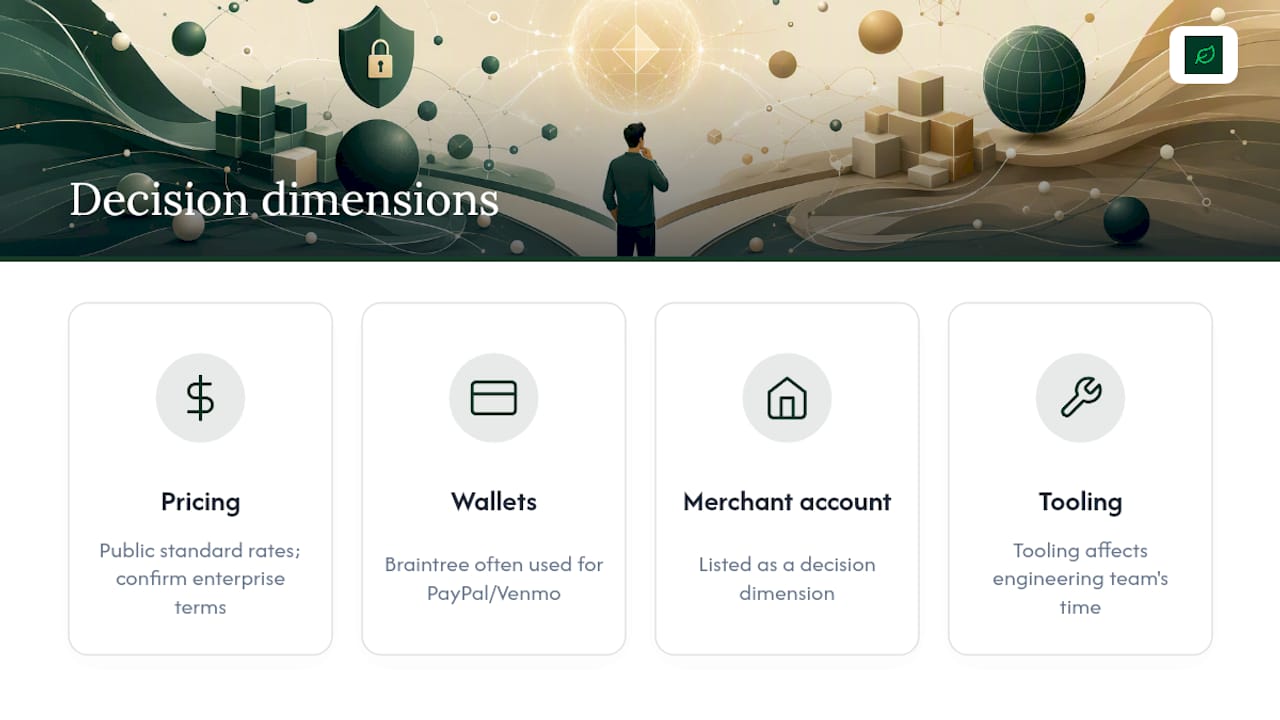
Rates reflect publicly listed standard pricing. Enterprise and volume contracts change the math — always confirm current rates directly with each provider. Braintree’s standard rates are publicly listed but negotiable at volume.
Pro Tip: Running both gateways is a legitimate architecture. Use Stripe as your primary card processor and Braintree as a dedicated PayPal/Venmo lane. Per industry reporting, this dual-gateway pattern is common among mid-market U.S. merchants.
What Do Stripe and Braintree Actually Cost Per Transaction?
Fees compound in ways that are not obvious from headline rates. The base percentage is just the start — cross-border surcharges, currency conversion, dispute fees, and add-on module costs all land on your P&L.
Fee lines to model before you commit
- Base processing rate (% + fixed cents)
- Cross-border surcharge (international cards)
- Currency conversion fee (if you settle in USD but accept foreign cards)
- ACH/bank transfer fees
- Instant payout fees (if you need same-day settlement)
- Dispute/chargeback fees
- Add-on product fees (Billing module, Radar, Tax)
- PayPal-specific markup (when PayPal is processed through Braintree’s PayPal lane)
Sample transaction math
Stripe’s published U.S. rate is 2.9% + $0.30 per successful card charge.
The crossover point sits roughly around $60–65 per transaction. Below that, Stripe’s lower fixed cent ($0.30 vs $0.49) wins. For high-AOV merchants — furniture, B2B, electronics — the Braintree rate advantage compounds meaningfully at volume.
Where hidden costs appear
Stripe Billing is a paid add-on for subscription management. If you run recurring revenue, that module fee adds to your effective rate. Stripe Billing covers hosted invoices, metered billing, and subscription APIs, but it is not included in the base 2.9% + $0.30. Radar, Stripe’s fraud tool, is also tiered — the standard version is included, but Radar for Fraud Teams (custom rules, review queues) carries an additional per-transaction charge.
Braintree includes its subscription tools without a separate module fee, which is a real cost advantage for early-stage SaaS or subscription commerce. However, if you route PayPal transactions through Braintree’s PayPal lane, PayPal’s own fee structure applies on top of Braintree’s gateway fee — confirm the exact blended rate with your Braintree rep before assuming parity.
Per 2026 comparison guides, Braintree has offered early-stage merchants fee concessions on initial processing volume. If you are pre-scale, it is worth asking about those terms directly.
Which Features Actually Differ Between the Two Platforms?
Both platforms handle card payments, digital wallets, and recurring billing. The differences that change outcomes are narrower than the marketing suggests — but they are real.
Card processing and tokenization
Stripe and Braintree both tokenize card data so you never touch raw PAN data. Stripe’s vault is tightly integrated with its Billing and Connect products. Braintree’s vault, documented in its developer docs, supports multi-use tokens across PayPal, Venmo, and cards in a single stored credential — useful when a customer’s preferred method varies by purchase.
Digital wallets and PayPal/Venmo
This is where the platforms diverge most sharply. Stripe supports Apple Pay and Google Pay natively, and its Link product accelerates checkout for returning users across the Stripe network. PayPal on Stripe requires a redirect or a third-party integration. Venmo is not natively available.
Braintree’s native PayPal and Venmo integrations are first-class — the Drop-In UI surfaces both alongside cards with no redirect. For U.S. consumer merchants where PayPal and Venmo drive checkout completion, that native experience reduces friction in a way that matters. Mid-2026 analysis confirms Braintree’s PayPal/Venmo network improves conversion in specific buyer cohorts.
Subscriptions and billing
- Stripe Billing: Full-featured subscription engine with metered billing, tiered pricing, hosted invoices, and a customer portal. Paid add-on.
- Braintree subscriptions: Solid recurring billing with plan management and trial periods. Included in the base product, no extra module fee.
If your subscription logic is complex (usage-based billing, multiple plan tiers, proration), Stripe Billing’s feature depth is worth the add-on cost. If you need straightforward fixed-interval billing, Braintree’s included tools are sufficient and cheaper.
Marketplace and platform tools
Stripe Connect handles multi-party payments, split payouts, and onboarding sub-accounts with a well-documented API. It is the more mature marketplace infrastructure of the two, with support for both direct and destination charges. Braintree’s sub-merchant model works but is less flexible for complex payout routing. If you are building a platform where third-party sellers receive payouts, Stripe Connect is the clearer choice.
Payout timing
Both platforms offer standard next-day or two-day payouts. Stripe’s instant payouts (available for eligible accounts) settle within 30 minutes for an additional fee. Braintree’s payout timing is standard; instant options are less prominently featured.
Hosted checkout vs embedded components
- Stripe: Stripe Checkout (hosted, low-code) and Stripe Elements (embeddable components for custom UIs). Both are well-maintained and widely used.
- Braintree: Drop-In UI (hosted component) and client-side SDKs for custom builds. The Drop-In is straightforward but less customizable than Stripe Elements.
For teams that want full UI control, Stripe Elements gives more flexibility. For teams that want a working payment form in an afternoon, Braintree’s Drop-In and Stripe Checkout are roughly equivalent in speed.
How Do the Developer Experiences Compare?
Developer tooling is a multiplier: it reduces integration time and ongoing maintenance costs, which often outweighs small per-transaction fee differences for growth-oriented merchants. Per APIScout’s 2026 developer comparison, Stripe’s SDK coverage, CLI, and webhook tooling provide lower friction for local testing and event-driven architectures.
SDK coverage and maintenance
Stripe maintains official SDKs for Node.js, Python, Ruby, PHP, Java, Go, and .NET, with active maintenance and frequent releases. Braintree covers the major languages (Node, Python, Ruby, PHP, Java, .NET) but the cadence of updates and community activity is lighter. For teams using Go or newer runtimes, Stripe’s coverage is more complete.
Local testing and webhook workflows
Stripe ships a CLI that lets you forward webhook events to a local server without a tunnel. You run stripe listen --forward-to localhost:3000/webhook and test end-to-end in minutes. Braintree’s webhook testing requires a tool like ngrok to expose a local port — functional, but an extra setup step that adds friction during development.
Idempotency and error handling
Both platforms support idempotency keys to prevent duplicate charges on retry. Stripe’s error object is more granular, with distinct codes for card declines, network errors, and fraud blocks. That specificity matters when you are building retry logic or surfacing user-facing error messages.
Time-to-implement estimates
- Simple checkout (card only): Stripe Checkout or Braintree Drop-In, 1–2 days for a developer familiar with REST APIs.
- Subscriptions: Stripe Billing, 3–5 days for a basic implementation; Braintree recurring, 2–4 days.
- Marketplace split payouts: Stripe Connect, 1–3 weeks depending on onboarding flow complexity; Braintree sub-merchant, similar range but with more manual steps.
Pro Tip: Stripe’s sandbox mirrors production behavior more closely than most gateways. Run your full test matrix — including failed cards, disputes, and webhook retries — in sandbox before going live. Stripe publishes a set of test card numbers for specific decline scenarios that save significant debugging time.
How Do Stripe and Braintree Handle Security, Fraud, and Disputes?
PCI compliance scope
Both platforms reduce your PCI scope significantly when you use their hosted components. With Stripe Checkout or Elements, and with Braintree’s Drop-In UI, card data never touches your servers — you operate at SAQ A or SAQ A-EP, the lightest compliance tiers. If you build a fully custom card form that posts raw card data to your server before tokenizing, your PCI scope expands to SAQ D, which requires a full audit.
Built-in fraud tooling
Stripe Radar is the clearer built-in fraud product. It runs machine learning models on every transaction, uses configurable rules, and integrates with Stripe’s review queue so your team can manually approve flagged orders. The standard Radar tier is included; Radar for Fraud Teams adds custom rules and a review workflow for an additional per-transaction fee.
Braintree does not ship a comparable built-in ML fraud tool. It integrates with third-party fraud platforms — Kount is a commonly referenced partner — which means an additional vendor relationship, integration effort, and cost. For merchants with high fraud exposure, that gap is meaningful.
- Stripe Radar: built-in, ML-driven, configurable rules, review queue
- Braintree fraud: third-party integrations required for advanced fraud scoring
- Both platforms are PCI DSS compliant at the platform level
- Both support 3D Secure 2 for additional cardholder authentication
Dispute handling and fees
Stripe charges $15 per dispute. Braintree’s dispute fee is also $15. The process differs: Stripe’s dispute dashboard lets you submit evidence directly and tracks deadlines in-product. Braintree’s dispute workflow is functional but less integrated into the main dashboard.
Pro Tip: *Stripe offers Chargeback Protection as an add-on — for an additional fee per transaction, Stripe covers the dispute cost and you keep the funds on eligible transactions.
Reducing chargebacks: a short checklist
- Use clear billing descriptors that match your brand name
- Send order confirmation and shipping emails with tracking
- Enable 3D Secure 2 for high-risk transaction segments
- Monitor your dispute rate weekly and investigate spikes immediately
- Keep customer service response times under 24 hours to resolve issues before they escalate to disputes
What Is the Difference Between Aggregated and Dedicated Merchant Accounts?
This distinction has real operational consequences — and it is one of the least-discussed differences between Stripe and Braintree.
Stripe operates as a payment facilitator (aggregated model). Your business shares a master merchant account with thousands of other Stripe merchants. Onboarding takes minutes because Stripe underwrites you against its own risk model rather than running a full bank-level review. The tradeoff: Stripe can place holds or freeze funds with limited notice if your transaction patterns trigger its automated risk systems. This is not hypothetical — it is a documented pattern for high-volume merchants in certain categories.
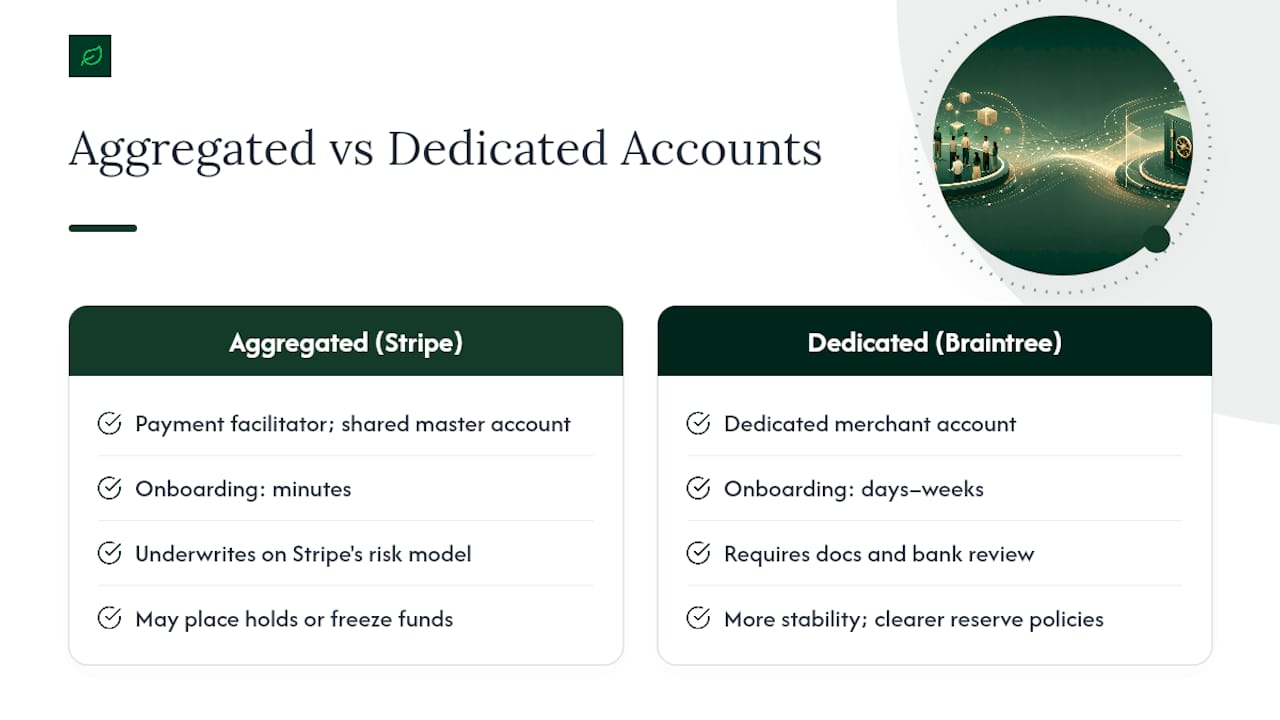
Braintree assigns a dedicated merchant account through its acquiring bank relationships. Underwriting takes days to weeks and requires documentation (business registration, bank account verification, sometimes processing history). Once approved, you have a direct relationship with the acquirer, which generally means more stability, clearer reserve policies, and a dedicated rep at volume. Per NerdWallet’s comparison, Braintree’s dedicated account model can offer more favorable per-transaction economics in some cases.
Underwriting readiness checklist
- Business registration documents (LLC, corp, or DBA filing)
- EIN and business bank account in the business name
- 3–6 months of processing history if available (statements help)
- Clear product/service description with a public-facing website
- Refund and shipping policy pages live on your site
- No high-risk category flags (adult content, firearms, CBD, crypto) without prior disclosure
Common triggers for holds or reserves on either platform: sudden volume spikes, high dispute rates, processing in a flagged category, or mismatched business descriptions. Prepare documentation before you need it, not after a hold is placed.
Which Gateway Fits Your Business Type?
-
Developer-led, headless commerce, or high subscription volume: Choose Stripe. The SDK depth, Billing module, Connect infrastructure, and Radar tooling are built for engineering teams that want to own the checkout experience end to end.
-
Marketplaces and platforms with complex payout needs: Choose Stripe Connect. Its direct charge, destination charge, and separate charge-and-transfer models cover most multi-party payout architectures. Braintree’s sub-merchant model works but requires more manual configuration for complex splits.
-
Retail and brick-and-mortar hybrid merchants: Stripe Terminal gives you a hardware path (card readers, tap-to-pay) that Braintree does not meaningfully compete with. If you need unified online and in-person reporting, Stripe is the practical choice.
-
Early-stage merchants where PayPal/Venmo conversion matters: Braintree. The native PayPal and Venmo Drop-In, combined with potential early-stage fee concessions and no separate billing module cost, makes Braintree the lower-friction, lower-cost starting point for consumer-facing merchants where those wallets drive purchases.
For context on how your platform choice interacts with gateway selection, Cannatract’s WooCommerce vs Shopify guide covers how each ecommerce platform handles payment gateway compatibility — worth reading before you finalize your stack.
What Are the Real Pros, Cons, and Tradeoffs?
Stripe
Pros:
- Best-in-class developer experience: CLI, SDKs, webhook tooling, and documentation
- Stripe Radar provides built-in ML fraud detection without a third-party vendor
- Stripe Connect is the most mature marketplace payout infrastructure available
- Stripe Terminal covers in-person and hybrid commerce
- Link and Checkout improvements deliver measurable mobile conversion lift
- Instant payouts available for eligible accounts
Cons:
- Aggregated merchant account model means account stability risk for high-volume or high-risk merchants
- Stripe Billing and Radar for Fraud Teams are paid add-ons that raise effective cost
- No native PayPal or Venmo acceptance
- Customer support is email/chat-first; phone support requires higher-tier plans
Braintree
Pros:
- Dedicated merchant account with more underwriting stability at volume
- Native PayPal and Venmo integrations improve conversion for U.S. consumer merchants
- Subscription billing included without a separate module fee
- Lower percentage rate benefits high-AOV merchants
- Dedicated account rep at volume
Cons:
- No built-in ML fraud tool; third-party integrations required
- Webhook testing requires external tunneling tools (ngrok)
- Less granular reporting and reconciliation than Stripe Sigma
- Onboarding takes days to weeks vs. Stripe’s near-instant setup
- Weaker in-person/POS story
The tradeoffs to accept up front
Choosing Stripe means accepting slightly higher effective fees at high AOV in exchange for better tooling and fraud coverage. Choosing Braintree means accepting a slower onboarding process and a third-party fraud vendor in exchange for PayPal/Venmo access and a dedicated merchant account.
Running both gateways solves the PayPal problem but adds integration complexity, dual reconciliation, and two vendor relationships to manage.
Migration and Integration Checklist
Whether you are switching from one gateway to the other or adding a parallel PayPal lane, the steps below apply. This checklist is authored by Cannatract based on common integration and migration patterns.
Pre-migration audit
- Reconcile active recurring customers. Export all active subscription records with billing dates, plan amounts, and stored token references. Identify customers whose next billing date falls within your migration window.
- Audit stored payment tokens. List every vaulted card token. Determine which tokens belong to active subscribers vs. one-time customers. Token migration between gateways requires coordination with both providers — most gateways will not export raw PANs, so you need a network tokenization or migration service.
- Pull dispute history. Document open disputes and their deadlines. Disputes tied to the old gateway must be resolved there, even after you migrate.
- Map webhook events. List every webhook your system consumes (payment succeeded, payment failed, dispute created, refund created). Confirm the new gateway fires equivalent events with compatible payloads.
Technical migration steps
- Token migration strategy. If you have stored cards, contact both gateways about network token portability. Stripe and Braintree both support network tokenization (Visa Token Service, Mastercard MDES), which can enable token migration without re-collecting card data. This is not guaranteed for all card types — plan for a re-collection flow for tokens that cannot migrate.
- Build webhook parity. Map old event names to new event names. Write adapter logic if payload shapes differ. Test every event type in sandbox before cutover.
- Implement idempotency keys on all charge requests. This prevents duplicate charges during the cutover window when retry logic may fire against both gateways.
- Build a test matrix. Cover: successful card charge, card decline (insufficient funds, stolen card), Apple Pay, Google Pay, PayPal (if applicable), ACH, refund, partial refund, dispute webhook, and subscription renewal.
Operational steps
- Complete merchant underwriting early. If moving to Braintree, start the dedicated account application 3–4 weeks before your planned cutover. Underwriting delays are the most common reason migrations slip.
- Plan customer communications. For subscription merchants, notify customers of any billing descriptor changes. A descriptor change without notice is a common dispute trigger.
- Define your fallback plan. Keep the old gateway active and capable of processing for 30 days post-cutover. If a critical issue surfaces, you need a rollback path that does not require re-integration.
Testing checklist before go-live
- End-to-end successful charge in production (small amount, refunded immediately)
- Decline handling: user-facing error messages are clear and not generic
- Webhook delivery confirmed for all critical event types
- Subscription renewal fires correctly on the expected date
- Dispute webhook received and routed to your support queue
- Reconciliation report matches expected totals for the test period
Pro Tip: Automate your reconciliation from day one. Map gateway transaction IDs to your internal order IDs in a dedicated reconciliation table, and run a nightly job that flags any gap between gateway settlements and your order management system. Cannatract’s automation services can build this as part of a gateway integration project — it saves significant manual accounting time at month-end.
How Should You Make the Final Decision?
Decision criteria checklist
- Average order value: Below ~$65, Stripe’s lower fixed cent wins on fee math. Above it, Braintree’s lower percentage wins.
- PayPal/Venmo share of checkout attempts: Above 15–20%, Braintree’s native integration is worth the dedicated account overhead.
- Subscription complexity: Complex metered or usage-based billing favors Stripe Billing. Simple fixed-interval billing favors Braintree’s included tools.
- Engineering resources: Smaller teams benefit from Stripe’s CLI and documentation depth. Braintree requires more manual setup for local testing.
- Fraud exposure: High-risk categories or elevated dispute rates favor Stripe Radar’s built-in coverage over Braintree’s third-party dependency.
- In-person sales: Any meaningful POS volume points to Stripe Terminal.
- Platform integrations: Confirm your ecommerce platform (Shopify, WooCommerce, BigCommerce) has a maintained plugin for your chosen gateway before committing.
Red flags to watch for in sales calls
- Opaque enterprise pricing with no written rate confirmation
- Vague answers about payout timing or reserve policies
- No sandbox access before you sign
- Sales rep cannot explain the dispute process step by step
Questions to ask before you sign
- What is the exact dispute fee, and what is the process for submitting evidence?
- What triggers a reserve, and what is the reserve release timeline?
- What is the SLA for support response during a payment outage?
- Can you export vaulted tokens if you need to migrate later, and in what format?
- What is the fraud model, and what controls do I have over the rules?
My Take on Stripe vs Braintree After Working Through Both
The Stripe vs Braintree debate gets framed as a pricing question more often than it should be. The per-transaction fee difference is real but modest for most merchants — the decision that actually moves the needle is tooling fit and account model.
Stripe wins for the majority of merchants not because it is cheaper, but because the integration is faster, the fraud coverage is built in, and the product suite grows with you. The aggregated account risk is real, but manageable with good documentation and clean transaction patterns. Braintree’s dedicated account model is genuinely valuable for high-volume merchants who have negotiating leverage and need PayPal/Venmo natively — that combination is hard to replicate elsewhere. Where clients consistently need support is not in picking a gateway, but in executing the migration cleanly: token portability, webhook parity, and reconciliation automation are where projects stall. Get those three right before you flip the switch.
Cannatract Can Handle Your Gateway Integration or Migration
Picking a gateway is the easy part. Building the integration correctly — token migration, webhook parity, reconciliation automation, and a clean rollback plan — is where most teams lose time and money.
Cannatract’s web development and e-commerce team handles gateway integrations and migrations end to end, with a fixed quote and a 2–4 week delivery window. A free automation audit scopes your current payment workflow, identifies the highest-risk migration steps, and gives you a clear implementation plan before you commit to anything.
Typical engagements cover:
- Gateway API integration and hosted component setup
- Token migration strategy and re-collection flow design
- Webhook mapping and event-driven reconciliation automation
- Subscription migration with zero billing interruption
- Post-launch monitoring and dispute routing setup
Book your free audit at Cannatract and get a scoped plan within 48 hours.
Sources
Official pricing and developer documentation to verify current rates and features:
- Braintree developer docs
- Stripe vs. Braintree in 2026: Which Payment Stack Wins? – Online Store News
- Stripe vs Braintree Fees & Features 2026: Guide
- Stripe vs Braintree: Payment API 2026 | APIScout
FAQ
Is Stripe better than Braintree for most online businesses?
For most developer-led, online-first merchants, yes. Stripe’s SDK depth, built-in Radar fraud tooling, and broader product suite (Checkout, Billing, Connect, Terminal) reduce integration time and cover more use cases without third-party add-ons. Braintree is the stronger choice when native PayPal and Venmo acceptance or a dedicated merchant account is a priority.
Who is Stripe’s biggest competitor?
Stripe’s most direct competitors in the U.S. payment processing market include Braintree (owned by PayPal), Square, and Adyen. Square is the strongest alternative for merchants with significant in-person sales volume; Adyen targets enterprise merchants with global acquiring needs.
Is Braintree a direct Stripe competitor?
Yes. Both platforms target online merchants and developers building payment-enabled products, and they overlap on card processing, subscriptions, and marketplace payouts. Braintree’s key differentiator is its native PayPal and Venmo network access; Stripe’s is its broader developer tooling and product suite.
Has Elon Musk invested in Stripe?
Elon Musk has not publicly invested in Stripe. Stripe is a private company backed by institutional investors including Sequoia Capital, Andreessen Horowitz, and Thrive Capital, among others. No credible public record connects Musk to a Stripe investment.
Can you use Stripe and Braintree at the same time?
Yes, and it is a common architecture for merchants where PayPal and Venmo drive meaningful checkout completions. Stripe handles card processing while Braintree serves as a dedicated PayPal/Venmo lane.