A post purchase flow is the automated email (and SMS) sequence that runs from the moment a customer places an order through their first realistic repurchase window. Its single most important job is to turn that first transaction into a second one. According to Bain & Company data cited by Geysera, repeat customers spend substantially more than first-time buyers, which makes the post-purchase window one of the highest-ROI places you can invest automation hours.
Here is the action plan. Build the flow in three phases: Confidence (Days 0–3, reassure and inform), Behavioral Branching (Days 4–17, split by product, order count, and engagement), and Lifecycle Integration (Days 17–82, replenishment, loyalty, and referral). The first practical step is to set up two event anchors in your platform: a Placed Order trigger for the order confirmation email and a Fulfilled/Tracking Delivered anchor for every engagement email that follows. Anchoring to delivery rather than purchase consistently produces higher open rates because the customer is thinking about the product when it arrives, not three days earlier when they clicked “buy.”
Minimal viable sequence (copy this today):
- Email 1 (Placed Order + 0 min): Order confirmation with order ID, estimated delivery, and a single support link
- Email 2 (Shipment Created + 0 min): Shipping notification with live tracking URL
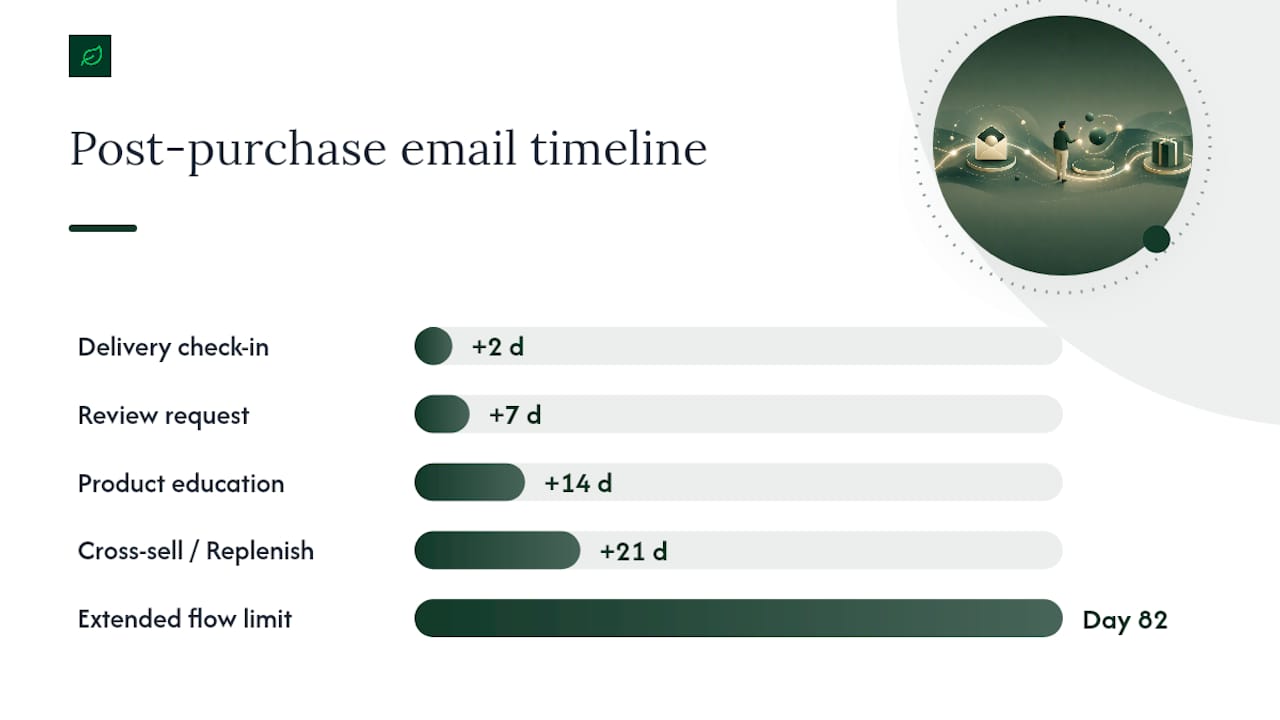
- Email 3 (Tracking Delivered + 2 days): Delivery check-in with usage tips and a soft “how is it going?” CTA
- Email 4 (Tracking Delivered + 7 days): Review request (Loox or equivalent) with a direct link to the product review form
- Email 5 (Tracking Delivered + 21 days): First cross-sell or replenishment prompt, conditional on no second purchase
Klaviyo recommends sending a distinct email after every purchase and using conditional splits based on order count so the sequence evolves for repeat buyers instead of replaying welcome content they have already seen.
Key Takeaways
A well-built post-purchase flow anchored to delivery events, segmented by order count, and measured with a holdout group consistently generates more incremental repeat revenue than any other single automation in an ecommerce stack.
| Point | Details |
|---|---|
| Anchor to delivery, not purchase | Trigger engagement emails from the Tracking Delivered event to match customer attention to product arrival. |
| Split first-time vs. repeat buyers | Use a first-time buyer flag at flow entry so repeat customers never receive welcome content they have already seen. |
| Measure revenue per recipient | Target roughly $3.22 per recipient as a benchmark; always compare against a holdout group to isolate incremental lift. |
| Reserve discounts for high-value asks | Offer discounts for review requests or subscription upgrades, not in confirmation emails where they train discount-seeking behavior. |
| Cannatract for complex builds | Cannatract delivers fixed-quote post-purchase automation systems with Shopify and Klaviyo integrations, shipped in 2–4 weeks. |
Table of Contents
- What core components does every post purchase flow need?
- What do ready-to-use post-purchase templates look like?
- How should you segment post-purchase flows by customer relationship?
- What copy, design, and offer tactics actually improve engagement?
- Which KPIs and benchmarks should you track for your post-purchase sequence?
- How do you handle edge cases and scale post-purchase automations?
- Annotated templates you can copy and adapt
- Should you build this yourself or hire an automation agency?
- Legal compliance in post-purchase communications
- How to handle negative experiences inside the flow
- What most teams get wrong about post-purchase automation
- Cannatract builds post-purchase flows that ship in weeks, not quarters
- Sources
- FAQ
What core components does every post purchase flow need?
A reliable post-purchase flow has two layers: transactional emails that customers expect and marketing emails that build the relationship. Conflating them is the most common structural mistake.
Transactional layer (required, always send):
- Order confirmation with order ID, itemized summary, and billing address
- Shipping notification with carrier name and a live tracking URL
- Delivery confirmation (triggered by the Tracking Delivered webhook)
Marketing layer (sequenced, consent-gated for GDPR audiences):
- Delivery check-in / product education email
- Review request (timed to product’s expected time-to-first-use)
- Cross-sell or replenishment prompt
- Loyalty or referral invite
- Return/refund exit handling (suppresses the marketing layer when a refund event fires)
ShipBob’s fulfillment infrastructure illustrates why tracking integrations matter: when your fulfillment provider passes reliable Delivered webhooks to Klaviyo or Bloomreach, you can anchor every post-delivery email to a real event rather than a guessed fixed delay. That shift alone reduces WISMO (“where is my order?”) tickets and improves engagement timing.
Required data fields to pass into the flow at trigger time:
order_idandorder_totalfulfillment_statusandtracking_urlproduct_skuandproduct_categoryfirst_time_buyerboolean flag (order count = 1)customer_emailand consent status
Missing the first_time_buyer flag is the single most common data gap. Without it, a returning customer who has already received your welcome-focused confidence email gets it again, which erodes trust fast.
Pro Tip: Before enabling any flow, run a test order through your full stack and inspect the event payload in your ESP’s activity feed. Confirm that tracking_url is populated and that fulfillment_status updates from “unfulfilled” to “fulfilled” before your shipping email fires. A broken webhook discovered in production is far more expensive than one caught in staging.
What do ready-to-use post-purchase templates look like?
The “3-email rule” is the floor, not the ceiling. It states that every post-purchase sequence should contain at minimum three emails: a transactional confirmation, a delivery-anchored check-in, and one conversion ask (review or cross-sell). Below that threshold, you are leaving measurable revenue on the table. Chronos Agency’s audit data supports extending well-built flows to Day 82 for products with repeat-purchase potential, using the three-phase architecture.
When to expand beyond three emails depends on product type. A consumable (supplements, coffee, skincare) warrants a 5–7 email sequence with a replenishment prompt at Day 21–30. A durable good (kitchen appliance, fitness equipment) benefits from a longer education arc. A high-touch product with a learning curve (software, complex hardware) needs usage-tip emails at Days 7, 14, and 30 before any cross-sell appears.
| Anchor Event | Delay | Email Purpose | Product-Type Note |
|---|---|---|---|
| Placed Order | Immediate | Order confirmation | All product types |
| Shipment Created | Immediate | Shipping notification | All product types |
| Tracking Delivered | +2 days | Delivery check-in + usage tips | All product types |
| Tracking Delivered | +7 days | Review request | Match to time-to-first-use |
| Tracking Delivered | +14 days | Product education / how-to | High-touch / learning-curve products |
| Tracking Delivered | +21 days | Cross-sell or replenishment | Consumables; skip for durables |
| Tracking Delivered | +30 days | Loyalty / referral invite | Repeat-potential products |
ConversionStudio’s benchmark data reports that well-structured post-purchase flows generate roughly $3.22 in revenue per recipient, based on Klaviyo benchmarks. That figure assumes a full sequence with delivery anchoring and at least one cross-sell or replenishment email.
Sample subject lines you can adapt:
- Confidence email: “Your order #{{order_id}} is confirmed — here’s what happens next”
- Delivery check-in: “Your [Product Name] just arrived — a quick tip to get started”
- First cross-sell: “Running low? Here’s what pairs well with [Product Name]”
The one-line formula for the confidence email: reassure + next step + support link. No offer, no upsell. The customer just spent money; the first email’s job is to confirm that was a good decision.
How should you segment post-purchase flows by customer relationship?
Segmentation at flow entry is what separates a professional post-purchase program from a single generic drip. The most important split is first-time buyer vs. repeat buyer, because the emotional context is completely different.
Entry-level segmentation rules:
- First-time buyer (order count = 1): Run the full confidence arc. These customers need reassurance, brand context, and social proof before any cross-sell.
- Repeat buyer (order count 2–4): Skip the brand introduction. Lead with product-specific tips and a loyalty acknowledgment.
- VIP / high AOV (order total above your defined threshold): Trigger a dedicated VIP sequence with priority support contact and an exclusive offer.
- Subscription vs. one-off: Subscription customers already have a replenishment cadence; suppress replenishment emails and route them to an engagement/education branch instead.
- Product family: A customer who bought from your skincare line gets skincare cross-sells, not your supplement catalog.
Conditional splits inside the flow extend this logic further. A customer who opens the Day 7 review request but does not click gets a follow-up nudge at Day 10. A customer who clicks but does not submit gets a direct link to the review form with a visual incentive. Loox recommends pointing the review link directly to the purchased item’s review page and timing the ask to match the product’s expected time-to-first-use, not a fixed calendar window.
For fulfillment issues, add a conditional split on fulfillment_status. If a Refunded Order event fires, immediately exit the customer from the marketing layer and route them to a service recovery branch. Do not send a cross-sell to someone who just returned a product.
Pro Tip: Instead of using fixed replenishment windows (e.g., “always email at Day 30”), pull the median repurchase interval from your order history for each product SKU and set that as the delay. Platforms like Klaviyo and Bloomreach support predictive analytics that calculate this per customer. A 28-day replenishment email for a 60-day supply product trains customers to ignore you.
What copy, design, and offer tactics actually improve engagement?
The first post-purchase email should not sell anything. That sounds counterintuitive, but Mailchimp’s post-purchase strategy guidance is clear: the confirmation and early delivery emails exist to build trust, not to convert again immediately. Customers who feel reassured after a purchase are more likely to open your next email.
Subject line and preheader rules:
- Confirmation email: include the order number in the subject line. It signals transactional relevance and drives open rates.
- Delivery check-in: use the product name, not a generic “your order arrived.” Specificity outperforms category language.
- Cross-sell: frame as a recommendation, not a promotion. “What pairs well with X” outperforms “20% off your next order.”
- Preheader: use it to add context the subject line cannot fit. Never repeat the subject line verbatim.
Design guidance:
- One hero image of the purchased product, not a catalog grid
- Tracking information placed above the fold in shipping emails
- For complex products, a two-step instructional block (step 1 image + step 2 image) outperforms a paragraph of text
- CTAs: one primary CTA per email. Two competing buttons reduce click-through rates.
On discounts: Reserve them for high-value asks. Offering a discount in the review request email is appropriate because you are asking the customer to do work. Offering a discount in the order confirmation email trains customers to delay purchases and wait for a post-checkout coupon. Alternatives to discounts include loyalty points, early access to new products, and exclusive how-to content.
Shopify’s native post-purchase offer feature supports only one active offer at a time. If you pause or edit the automation, existing unused codes remain available to customers, and deleting the automation resets your performance metrics. Use Shopify’s post-purchase offer for narrow, high-intent moments (an immediate upsell at checkout) rather than as your primary ongoing discount vehicle.
Which KPIs and benchmarks should you track for your post-purchase sequence?
Revenue per recipient is the single most important flow-level metric. It captures the combined effect of open rate, click rate, and conversion rate in one number, and it lets you compare flows of different lengths on equal footing.
Essential KPIs:
- Revenue per recipient (flow-level): Total flow-attributed revenue ÷ total recipients. Benchmark: roughly $3.22 per recipient for well-structured flows, per ConversionStudio’s Klaviyo benchmark data.
- Repeat purchase rate at 30/60/90 days: What percentage of first-time buyers make a second purchase within each window.
- Time to second purchase: Median days between Order 1 and Order 2. Shortening this is the clearest signal your flow is working.
- Open rate by email position: Confirmation emails typically open at 60%+. Delivery check-ins at 45–55%. Cross-sell emails at 20–30%.
- Review conversion rate: Clicks on review request ÷ emails delivered. A well-timed Loox prompt with a direct link to the product review form typically outperforms a generic “leave a review” CTA.
- Cross-sell conversion rate: Purchases from cross-sell emails ÷ recipients of those emails.
Sample ROI calculation:
Suppose your flow reaches 1,000 recipients per month. At $3.22 revenue per recipient, the flow generates $3,220 in monthly attributed revenue. That is the number to compare against your platform and agency costs.
Running meaningful tests:
Run the holdout for at least 60 days before drawing conclusions. Minimum viable sample size is roughly 500 recipients per variant to detect a meaningful difference in repeat purchase rate. Never delete a flow mid-test; as noted above, deleting a Shopify post-purchase automation resets its performance data.
Benchmark callout: Post-purchase open rates run materially higher than standard promotional emails. Confirmation emails regularly exceed 60% open rates because customers actively look for them. That attention window is the most valuable real estate in your email program.
How do you handle edge cases and scale post-purchase automations?
Real-world post-purchase flows break in predictable ways. Building for the edge cases before launch is faster than patching them after a customer complains.
Conditional split recipes for common problems:
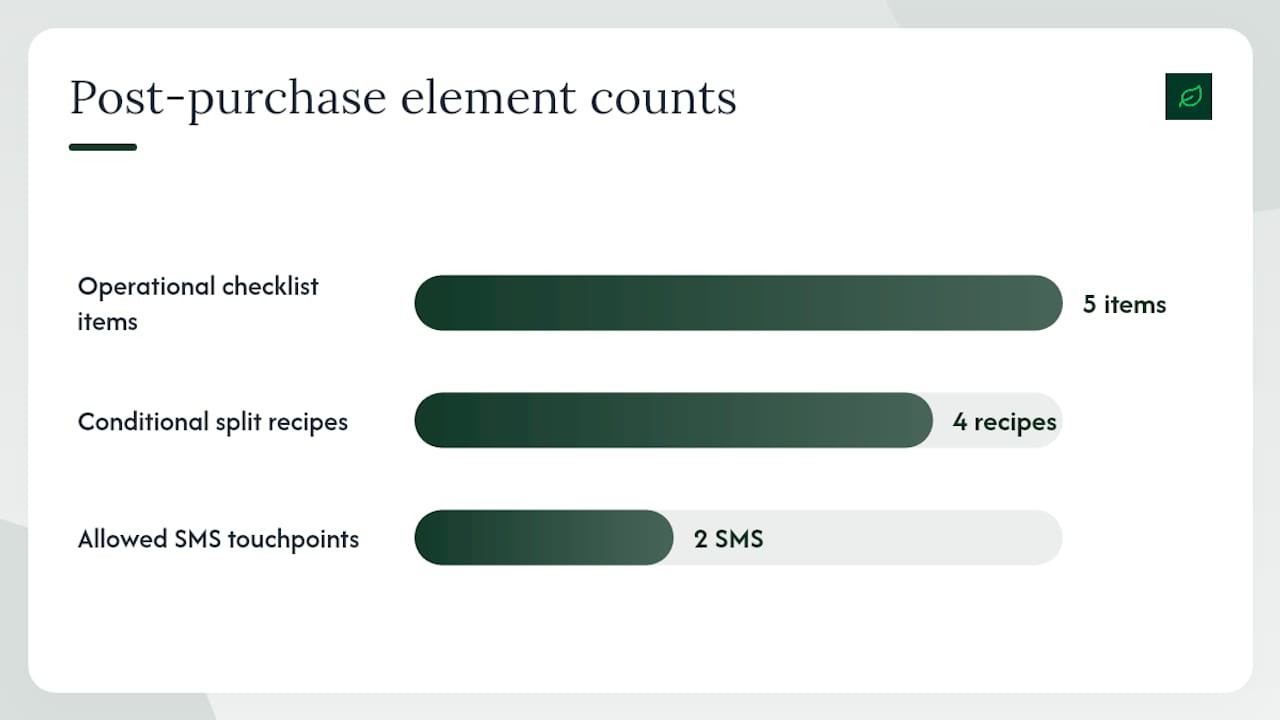
- Refunded order: Add a Refunded Order event filter at every marketing email. If the event fires before the email sends, skip it and route to a service recovery branch with a support contact and a “we want to make this right” message.
- Multi-item order with mixed fulfillment: If items ship from multiple warehouses (common with ShipBob multi-node setups), wait for the last Tracking Delivered event before triggering the delivery check-in. Sending “your order arrived!” when half the order is still in transit is a trust-breaker.
- Partial refund: Suppress cross-sell emails but allow the review request to send. A customer who returned one item from a two-item order may still want to review the item they kept.
- International delivery delays: Add a 5-day buffer to all delivery-anchored delays for international orders. Use the
shipping_countryproperty to apply this split at flow entry.
SMS and in-app touches:
Limit SMS to two touchpoints in the post-purchase window: a delivery confirmation and a problem-solution follow-up if a delay event fires. SMS requires explicit opt-in consent, which must be collected at checkout or account creation, not assumed from an email subscription. Gate every SMS send behind a sms_consent = true filter.
Operational checklist before going live:
- Confirm tracking webhooks are firing correctly from your fulfillment provider
- Add a suppression list for customers who have already received the flow (prevents re-entry on a second purchase before the first flow completes)
- Document every trigger, filter, and split condition in a version-controlled spec sheet
- Set a rollback procedure: know which emails to pause and in what order if a data error surfaces post-launch
- Tag each flow version with a date and change description so seasonal edits do not overwrite audit history
Annotated templates you can copy and adapt
These three templates cover the highest-leverage emails in any post-purchase sequence. Each annotation explains the personalization token or conditional logic that makes it work.
Template 1: Order confirmation / confidence email
- Subject: “Order #{{order_id}} confirmed — here’s what to expect”
- Preheader: “Estimated delivery: {{estimated_delivery_date}}”
- Body block 1: Hero image of purchased product (
{{product_image_url}}from SKU feed) - Body block 2: Order summary table (item, quantity, price) pulled from
{{line_items}} - Body block 3: Shipping timeline with
{{estimated_delivery_date}}and a support email link - CTA: “Track your order” →
{{tracking_url}} - Annotation: No offer, no cross-sell. The only goal is to confirm the purchase and reduce anxiety. Klaviyo’s dynamic product blocks pull the image and line items automatically from the Shopify order payload.
Template 2: Delivery check-in with usage tips
- Subject: “Your {{product_name}} is here — one tip before you start”
- Trigger: Tracking Delivered + 2 days
- Conditional split: If
order_count = 1, show brand welcome block. Iforder_count > 1, skip to product tips. - Body block 1: Two-step instructional graphic (sourced from product SKU content library)
- Body block 2: Link to full setup guide or video
- CTA: “See the full guide” → product education URL
- Annotation: The conditional split on order count (a Klaviyo native feature) prevents repeat buyers from seeing first-timer content. ShipBob’s Tracking Delivered webhook fires this trigger reliably when fulfillment data is integrated.
Template 3: First cross-sell
- Subject: “What pairs well with {{product_name}}”
- Trigger: Tracking Delivered + 21 days; conditional on no second purchase in the window
- Conditional split: If
second_purchase_made = true, suppress this email entirely - Body block 1: Dynamic product recommendation block (top 2 SKUs from the same product family)
- Body block 2: Short social proof line: “X customers who bought {{product_name}} also love [recommended product]”
- CTA: “Shop the pairing” → collection URL
- Annotation: The suppression condition (
second_purchase_made = true) prevents sending a cross-sell to someone who already converted. Loox review data can populate the social proof line if your review app feeds star ratings into your ESP’s product catalog.
Bloomreach users can replicate this architecture using its Scenarios module, which supports the same event-triggered conditional logic as Klaviyo flows.
Should you build this yourself or hire an automation agency?
The honest answer depends on four variables: your monthly order volume, your stack complexity, your team’s bandwidth, and whether your flows need compliance guardrails.
Build it yourself when:
- You are on Shopify with Klaviyo and your order volume is under 500 orders per month
- Your product catalog is simple (one or two SKUs, no mixed fulfillment)
- You have a team member who can own the flow, monitor metrics, and update it quarterly
- Your compliance requirements are standard (CAN-SPAM, basic GDPR consent capture)
Hire an agency when:
- You are processing 500+ orders per month and leaving measurable revenue on the table with a basic flow
- Your stack involves custom webhooks, a headless storefront, or a fulfillment provider that requires API integration
- You need conditional splits across multiple product lines, international shipping rules, and SMS consent gating
- You are in a regulated industry where post-purchase communications must meet specific disclosure or consent standards
What a qualified agency engagement should deliver:
- A fixed-quote discovery call with a documented scope (triggers, splits, email count, integrations)
- A working system shipped in 2–4 weeks, not a 90-day roadmap
- A handover package: documented flow architecture, segmentation rules, test plan, and rollback procedure
- A measurement plan with defined KPIs and a 60-day holdout test built in
Operational handoff items to require from any agency:
- Trigger documentation (event names, payload fields, filter conditions)
- Segmentation rules in plain language, not just platform screenshots
- A test plan specifying holdout size, duration, and success metrics
- A rollback procedure for each email in the flow
Legal compliance in post-purchase communications
Post-purchase emails span two legal categories, and confusing them creates real liability.
Transactional emails (order confirmation, shipping notification, delivery confirmation) are exempt from CAN-SPAM’s opt-out requirement because their primary purpose is to complete a transaction the customer initiated. They must still include accurate sender information and a physical mailing address, but they do not require an unsubscribe link.
Marketing emails (review requests, cross-sells, loyalty invites) are commercial messages under CAN-SPAM and require a clear unsubscribe mechanism, accurate “From” and subject line information, and your physical address. Every marketing email in your post-purchase sequence must honor opt-outs within 10 business days.
For GDPR-covered recipients (EU and UK customers), the legal basis for marketing emails is typically legitimate interest or explicit consent, depending on your jurisdiction’s interpretation. The safest approach: collect explicit email marketing consent at checkout, tag it in your ESP, and gate every marketing-layer email behind a marketing_consent = true filter. Transactional emails can send without that flag; marketing emails cannot.
SMS post-purchase messages require explicit prior written consent under the Telephone Consumer Protection Act (TCPA) in the United States, regardless of whether the customer has email marketing consent. Collect SMS opt-in separately at checkout or in a post-purchase preference center.
One practical step: audit your Klaviyo or Bloomreach flow filters right now and confirm that every non-transactional email has a consent filter applied. Missing that filter on a cross-sell email sent to an unsubscribed customer is a CAN-SPAM violation.
How to handle negative experiences inside the flow
A post-purchase flow that ignores bad outcomes trains customers to distrust your brand. Build the recovery path before you need it.
The most common negative signals to watch for: a Refunded Order event, a customer service ticket opened within 7 days of delivery, a one-star review submitted through Loox, and a delivery delay flag from ShipBob or your tracking provider.
When a refund event fires, exit the customer from the marketing layer immediately and send a single service recovery email within 24 hours. The email should acknowledge the return, confirm the refund timeline, and offer a direct support contact. No discount, no upsell. The goal is to close the loop cleanly so the customer does not feel ignored.
For delivery delays, send a proactive delay notification as soon as the tracking data shows an exception. Customers who receive a proactive delay email are significantly less likely to file a chargeback or contact support than customers who discover the delay themselves. The subject line formula: “A quick update on your [Product Name] order” with the new estimated delivery date in the preheader.
For negative reviews, route the customer to a private support channel rather than responding publicly in the review thread. A Loox review that receives a personal follow-up from your support team within 48 hours has a measurable chance of being updated. Build a conditional split: if a review with a rating below 3 stars is submitted, trigger a support outreach email within 24 hours.
The broader principle: every negative signal in your post-purchase data is a branching condition, not a dead end. Map the recovery path for each one before launch, and your flow handles complaints at scale without manual intervention.
What most teams get wrong about post-purchase automation
Most post-purchase flows I see during audits share the same structural flaw: they are built around the purchase event, not the delivery event. The entire sequence fires on a fixed schedule from the moment the customer clicks “buy,” which means a review request lands in the inbox three days after purchase, before the product has even arrived. The customer ignores it, the review rate stays low, and the team concludes that review emails “don’t work.”
The second mistake is treating the flow as a set-and-forget asset. A post-purchase flow built in Q1 for a spring product launch will have the wrong cross-sell recommendations, the wrong replenishment timing, and possibly the wrong consent filters by Q3. Flows need quarterly reviews, not annual ones.
The third mistake, and the one with the highest cost, is skipping the holdout group. Without a holdout, you cannot separate the revenue your flow generates from the revenue customers would have spent anyway. I have seen teams celebrate a $4.00 revenue-per-recipient figure that, when a holdout was finally added, turned out to be $1.20 incremental. The Chronos Agency architecture that extends flows to Day 82 only makes sense if you are measuring incremental lift, not total attributed revenue.
Build the holdout on Day 1. Measure incrementally. Anchor to delivery. Those three decisions separate flows that generate real revenue from flows that look good in a dashboard.
Cannatract builds post-purchase flows that ship in weeks, not quarters
If your post-purchase sequence is a basic order confirmation and a single follow-up email, you are leaving a measurable share of repeat revenue uncaptured. Cannatract designs and builds complete post-purchase automation systems: Klaviyo flows with delivery-anchored triggers, Shopify fulfillment integrations, conditional splits for first-time vs. repeat buyers, SMS consent gating, and holdout-based measurement plans. Every project starts with a fixed quote and a documented scope, and working systems ship in 2–4 weeks.
The difference between a flow that generates $3.22 per recipient and one that generates $0.80 is almost always architecture and data quality, not the email copy. Cannatract’s free automation audit identifies exactly where your current flow is losing revenue and what it would take to fix it. Book yours at cannatract.co.
Sources
- Post-purchase email guide: examples + expert advice - Klaviyo
- How to Build a Post-Purchase Email & SMS Flow | Chronos Agency
- Post-Purchase Email Sequence Guide | ConversionStudio
- Post Purchase Email Strategy: Build Trust After the Sale | Mailchimp
- Post-Purchase Email Flow Guide (2026) - Geysera
FAQ
What does “post purchase” mean in email marketing?
Post purchase refers to the automated communication sequence that begins after a customer completes a transaction. Its goal is to reassure the buyer, deliver product value, and convert a one-time purchase into a repeat relationship.
What is the 3-email rule for post-purchase sequences?
The 3-email rule sets the minimum viable post-purchase sequence: an order confirmation, a delivery check-in, and one conversion ask (review request or cross-sell). Expanding to 5–7 emails is appropriate for consumables or high-touch products with repeat-purchase potential.
What is an example of a post-purchase email?
A delivery check-in email sent two days after the Tracking Delivered event, containing the product name in the subject line, a two-step usage tip, and a single CTA linking to a setup guide, is a strong example. It reassures the customer and builds product engagement before any cross-sell appears.
What are the five steps of email marketing?
A standard email marketing framework covers: (1) list building and consent capture, (2) segmentation and audience definition, (3) content and sequence design, (4) delivery and automation setup, and (5) measurement and optimization. Post-purchase flows operate across steps 2 through 5 of that cycle.
How do you measure whether a post-purchase flow is actually working?
Track revenue per recipient at the flow level and compare it against a holdout group that receives only transactional emails. The difference between the two groups is your incremental revenue. Repeat purchase rate at 30, 60, and 90 days and time to second purchase are the supporting metrics that explain why the number moved.