TL;DR:
- HubSpot is the better starting point for most regulated and high-growth U.S. businesses building custom AI automation due to faster deployment and lower admin overhead. Salesforce is ideal when complex compliance requirements and extensive customization are necessary, though it involves higher costs and longer implementation times. Cannatract offers quick, compliant AI automation development on either platform through fixed-price projects and free audits.
For most regulated and high-growth U.S. businesses building custom AI automation, HubSpot is the better starting point — faster to deploy, lower admin overhead, and strong enough for most mid-market workflows. Choose Salesforce when your compliance requirements demand field-level security, multi-step approval flows, or a blank-slate data model that can absorb complex custom objects.
Two factors drive that split:
- Speed-to-value and admin overhead: HubSpot’s opinionated data model lets a lean team ship a working nurture-to-close workflow in days, not months. Salesforce’s power is real, but it typically requires a dedicated admin or implementation partner before it pays off.
- Compliance ceiling: For HIPAA-covered workflows, granular permissioning, or audit-trail requirements that go beyond standard role-based access, Salesforce’s field-level security and multi-step approval architecture are genuinely harder to replicate in HubSpot, even at Enterprise tier.
Migration and total cost of ownership are material. Switching platforms mid-growth is expensive and disruptive, so the sections below cover both before you commit.
Table of Contents
- How does HubSpot vs Salesforce compare across what actually matters?
- What questions should you ask before choosing?
- How do you implement AI-driven automation on each platform?
- What does migration actually cost, and what trips teams up?
- When should you hire an implementation partner?
- Key Takeaways
- The platform choice matters less than the implementation
- Cannatract builds compliant AI automations on your CRM of choice
- Useful sources
- FAQ
How does HubSpot vs Salesforce compare across what actually matters?
| Dimension | HubSpot | Salesforce | Edge |
|---|---|---|---|
| Best for | SMBs, mid-market, marketing + sales | Enterprise, complex regulated ops | Depends on size |
| Pricing (entry paid) | HubSpot Sales Hub typically starts at a lower per-user monthly price than Salesforce. | Salesforce pricing is higher at entry tiers. | HubSpot |
| Pricing (top tier) | HubSpot’s maximum per-seat price is lower than Salesforce’s Agentforce tier, which reaches $550/user/month. | Salesforce reaches $550/user/month at Agentforce tier. | HubSpot |
| Admin complexity | Low; self-serve for most configs | High; needs dedicated admin or partner | HubSpot |
| Customization ceiling | Strong within guardrails | Effectively unlimited (Apex, custom objects) | Salesforce |
| AI & automation | Breeze (pre-built assistants, workflows) | Agentforce (custom AI agents, Einstein) | Salesforce for custom agents |
| Integration depth | app marketplace, fast onboarding | AppExchange + platform events, deeper but slower | HubSpot for speed; Salesforce for depth |
| Security & compliance | SOC 2 Type II, GDPR tools, HIPAA BAA (Enterprise) | SOC 2, ISO 27001, HIPAA BAA, field-level security | Salesforce |
| Implementation timeline | 2 weeks typical | months for regulated builds | HubSpot |
Verdict by archetype:
- Fast-to-value regulated SMB (under 50 seats): HubSpot. Lower TCO, faster adoption, and marketing plus sales on one platform without stitching tools together.
- Mid-market growing teams (50–200 seats, RevOps): HubSpot Professional or Enterprise, with a clear migration plan to Salesforce if custom object complexity grows past HubSpot’s guardrails.
- Enterprise with strict compliance and in-house admin: Salesforce. The Agentforce and Einstein platform supports custom AI agents with the architectural depth regulated industries need, but budget for developer time and a certified partner.
What questions should you ask before choosing?
A structured decision process saves months of regret. Work through these by domain.
Compliance and permissions
- Do you need field-level security on individual record attributes, not just object-level roles?
- Does your workflow require multi-step compliance approvals with an auditable chain of custody?
- Are you subject to HIPAA and need a signed BAA with your CRM vendor?
Integrations and APIs
- How many systems does your CRM need to exchange data with in real time?
- Do you have middleware (MuleSoft, Boomi, or a custom event bus) already in place, or will the CRM need to carry that load?
AI agent extensibility
- Do you need to build fully custom AI agents that call external models, or are pre-built assistants sufficient?
- Salesforce Agentforce supports deep custom agent architectures; HubSpot Breeze is better suited to assistive, pre-built automation.
Red flags by direction:
- Push toward Salesforce if: mandatory field-level security, complex territory models, multi-step approval chains, or custom AI agents that need platform events and Apex triggers.
- Push toward HubSpot if: you need marketing and sales in one tool immediately, your admin team is lean, or time-to-first-value within a quarter is non-negotiable.
Simple scoring approach: Weight five criteria (compliance depth, speed-to-value, custom object need, AI extensibility, TCO) from 1–5 for your organization. If compliance and custom objects score 4+ each, Salesforce wins. If speed and TCO score 4+ each, HubSpot wins. Ties go to HubSpot for most teams under 100 seats.
Pro Tip: Run a two-week pilot on a single pipeline, not the whole org. Define one adoption metric (percentage of reps logging activities in the new system) before you start. A platform your team ignores has zero ROI regardless of its feature list.
How do you implement AI-driven automation on each platform?
Architecture matters more than the platform choice itself. A modular agent layer that sits outside the CRM, communicates via webhooks or platform events, and writes structured results back to CRM records works on both HubSpot and Salesforce. The differences are in the plumbing.
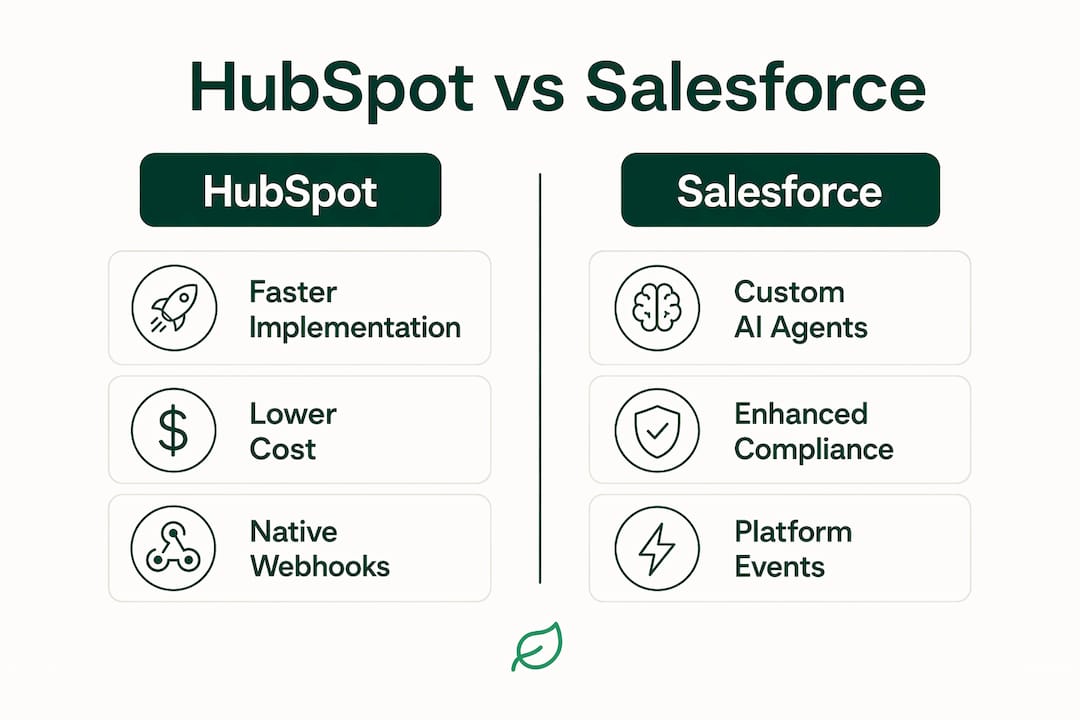
HubSpot architecture pattern: Use HubSpot’s native webhooks to trigger an external AI agent on deal stage changes or form submissions. The agent processes data, calls your model, and writes results back via the CRM API. HubSpot’s opinionated data model accelerates this because the object schema is predictable. Onboarding to the API typically takes days.

Salesforce architecture pattern: Use Platform Events or Change Data Capture to trigger agents. Salesforce’s blank-slate custom objects give you more modeling flexibility, but you design the schema from scratch. Apex triggers and Flow orchestration add power but require developer resources. Agentforce sits natively on this stack for teams that want AI agents managed within Salesforce itself.
Compliance controls to build into either architecture:
- Isolate PHI/PII in a secure data store (not the CRM) used for AI model training.
- Encrypt data at rest and in transit; confirm vendor certifications (SOC 2 Type II, ISO 27001).
- Implement role-based access at the CRM layer; add field-level security in Salesforce for regulated attributes.
- Enable audit trails on all record modifications; configure BAA with your CRM vendor if HIPAA applies.
- Stage rollout: discovery, data model mapping, agent proof-of-concept, compliance review, then production.
| Phase | HubSpot timeline | Salesforce timeline |
|---|---|---|
| Discovery & data model | 1–2 weeks | 2–4 weeks |
| Agent proof-of-concept | 1–2 weeks | 2–4 weeks |
| Compliance review | 1 week | 2–3 weeks |
| Staged rollout | 1–3 weeks | weeks |
| Total | weeks | weeks |
Pro Tip: Never train AI models directly on live CRM records. Pull a sanitized, de-identified copy into a secure staging environment. Keep the CRM as your system of record; keep the model training data in a separate, access-controlled store.
What does migration actually cost, and what trips teams up?
Migrating to Salesforce is almost always more complex than migrating to HubSpot because Salesforce requires re-engineering your operational data model from the ground up. That is not a reason to avoid it; it is a reason to budget honestly.
Migration checklist:
- Audit your current data model: custom objects, properties, associations.
- Map workflows and automation rules to the destination platform’s logic engine.
- Validate reporting continuity: attribution models rarely transfer cleanly.
- Plan user retraining before go-live, not after.
- Budget for overlap licensing during the transition period.
Common pitfalls: Underestimating custom object work is the most expensive mistake. Teams also lose attribution continuity when historical campaign data doesn’t map to the new model, and adoption drops sharply during long onboarding periods.
| Scenario | Typical timeline | Key cost drivers |
|---|---|---|
| Small move (simple data) | weeks | Data export/import, basic retraining |
| Mid-market replatform | weeks | Consulting, workflow translation, reporting rebuild |
| Enterprise migration with compliance gates | months | Data model redesign, compliance review, parallel run |
For small teams, HubSpot typically costs less over a standard upgrade path. Salesforce’s cost advantage appears only once you have 50+ seats, in-house admin resources, and process complexity that justifies the overhead.
When should you hire an implementation partner?
Build in-house when your team includes a certified admin, the workflow is contained to one or two objects, and you have a clear data model already. Hire a partner when any of these apply:
- No in-house certified admin for the target platform.
- Compliance requirements (HIPAA, SOC 2 evidence, audit trails) that need documented architecture decisions.
- Multi-system orchestration across CRM, billing, EHR, or custom AI agents.
- Need for a fixed-price, time-boxed pilot with defined success metrics.
Partner selection criteria for regulated industries: Look for documented case studies in your vertical, SOC 2 or ISO evidence in their own operations, API and data engineering depth, and experience with AI model ops. A partner who can show you a messaging workflow they built and maintained, not just configured, is worth more than one with a long client list.
Engagement models to consider:
- Fixed-price pilot (2–4 weeks, single workflow, defined deliverable)
- Milestone-based implementation (phased delivery tied to go-live gates)
- Managed monthly engagement (ongoing automation management and iteration)
Key Takeaways
For most regulated and high-growth U.S. businesses, HubSpot is the faster, lower-risk starting point for custom AI automation, while Salesforce is the right choice when compliance depth and custom object complexity exceed HubSpot’s guardrails.
| Point | Details |
|---|---|
| Platform fit by size | HubSpot wins under 100 seats; Salesforce justifies its cost at 50+ seats with in-house admin. |
| Pricing gap | HubSpot’s maximum per-seat monthly price remains below Salesforce’s Agentforce tier, which reaches $550/user/month. |
| AI agent extensibility | Salesforce Agentforce supports fully custom AI agents; HubSpot Breeze is better for pre-built assistive automation. |
| Migration risk | Salesforce migrations require data model redesign; budget months for enterprise compliance builds. |
| Cannatract option | Cannatract ships a working AI automation on either platform in 2–4 weeks with a fixed quote and a free audit to start. |
The platform choice matters less than the implementation
Here is the opinion that most comparison articles won’t give you: the HubSpot vs Salesforce decision is frequently the wrong first question. Teams spend weeks in vendor evaluation when the real constraint is that they have no clear data model, no defined AI agent scope, and no adoption metric. A poorly scoped Salesforce build will underperform a well-scoped HubSpot build every time.
The “reporting theater” problem is real. Platforms become so complex that teams spend more time managing the CRM than running the business. Adoption is the only metric that matters for ROI, and HubSpot consistently wins on adoption for teams that don’t have a dedicated admin. Salesforce’s power is genuine, but power without staffing is just expensive configuration.
For regulated industries specifically, the compliance argument for Salesforce is often overstated at the SMB level. HubSpot Enterprise with a BAA covers HIPAA for most use cases. The gap opens when you need field-level security on individual attributes, complex approval chains, or a data model that needs to absorb five years of custom object growth. If you’re not there yet, you’re paying for a ceiling you won’t reach.
The smarter move: pilot on a single workflow, measure adoption in week two, and let the data tell you whether you’ve outgrown the platform.
Cannatract builds compliant AI automations on your CRM of choice
If you’ve read this far, you know which platform fits your org. What most teams don’t have is the time to build the AI agent layer, map the data model, and validate compliance controls while running the business. That’s exactly what Cannatract does.
Cannatract is a Nevada-based AI automation agency that designs and builds custom AI agents, workflow automations, and CRM integrations for regulated and high-growth U.S. businesses. Every engagement starts with a free automation audit to identify the workflow costing your team the most time. From there, you get a fixed quote and a working system in 2–4 weeks. No open-ended retainers, no vague deliverables. Book your free audit at cannatract.co and get a clear scope before you commit to anything.
Useful sources
- HubSpot vs Salesforce 2026 | Softabase — Detailed feature and compliance comparison; use to validate customization claims and security certifications during procurement.
- Salesforce vs HubSpot | Zapier — Covers AI capabilities and migration complexity; cite when scoping Agentforce vs Breeze for custom agent builds.
- Salesforce vs HubSpot | ZDNet — Independent review with buyer archetype guidance; useful for board-level justification.
- HubSpot vs Salesforce TCO | Venture Harbour — Published TCO bands by team size; use to pressure-test your license and implementation budget.
- Brown Bag Consultants — CRM & Messaging — Practical guidance on CRM messaging workflows and lead conversion; useful for integration planning.
Stat to know: HubSpot scores 4.35 out of 5 on a weighted CRM evaluation (ease of use, features, value, scalability, integrations, AI) versus Salesforce at 4.15 — but flip the weights toward customization and scale and Salesforce leads. Your weighting is the decision.
FAQ
Is HubSpot or Salesforce better for regulated U.S. industries?
Salesforce is the stronger choice when field-level security, multi-step compliance approvals, and granular audit trails are mandatory. HubSpot Enterprise with a HIPAA BAA covers most SMB and mid-market regulated use cases at lower cost and faster deployment.
How does HubSpot vs Salesforce pricing compare at scale?
HubSpot Sales Hub tops out at a lower per-seat monthly price than Salesforce Agentforce, which reaches $550/user/month, making HubSpot generally less expensive per user for most teams. For small teams, HubSpot typically costs less; Salesforce’s total cost becomes justifiable at 50+ seats with in-house admin resources.
Which platform supports custom AI agents better?
Salesforce Agentforce is purpose-built for custom AI agents with platform events, Apex triggers, and Einstein as the underlying model layer. HubSpot Breeze offers pre-built assistive automation that’s faster to deploy but less extensible for fully custom agent architectures.
How long does a typical CRM migration take?
Small moves generally take a few weeks, mid-market replatforms last a few months, and enterprise migrations with compliance requirements can extend over several months, mainly due to Salesforce’s need for data model redesign.
Can Cannatract build AI automations on either platform?
Yes. Cannatract builds custom AI agents and workflow automations on both HubSpot and Salesforce, starting with a free automation audit and delivering a working system in 2–4 weeks on a fixed quote.