For most production speech-to-text work, a hosted low-latency API like Deepgram wins for real-time English transcription, while a self-hosted or API-based Whisper route wins when your workload is batch-heavy, multilingual, or cost-sensitive at scale. That’s the practical shortlist. Everything else in this comparison, word error rate (WER), real-time factor (RTF), diarization, HIPAA compliance, is detail that helps you confirm which side of that line your project falls on.
Deepgram and Whisper solve overlapping but distinct problems. Deepgram was built as a hosted, production-grade API optimized for conversational and streaming audio. Whisper started as an open-source research model from OpenAI and now also ships as a hosted API (whisper-1), with gpt-transcribe recommended by OpenAI for general transcription needs. If you’re evaluating a build for a call center, a live captioning tool, or a compliance-heavy transcription pipeline, here’s the shortlist worth testing first:
- Hosted low-latency streaming API (Deepgram-style): best for real-time English or major-language conversational audio, phone calls, live captions, voice agents.
- Hosted multilingual batch API (Whisper-based, including
whisper-1orgpt-transcribe): best for translation tasks, subtitle generation, and workloads spanning many of the roughly 98 languages OpenAI documents for Whisper. - Self-hosted open-source Whisper route: best for high-volume batch transcription where amortized GPU cost beats per-minute API pricing, and where you control data residency directly.
Key Takeaways
Choosing between Deepgram and Whisper comes down to matching your latency, language, and volume requirements to the right deployment category, then confirming that choice with your own representative benchmark.
| Point | Details |
|---|---|
| Match route to constraint | Hosted APIs win on latency and ops simplicity; self-hosted Whisper wins on multilingual coverage and cost at high volume. |
| Test your own audio | Published WER numbers on clean datasets rarely predict performance on noisy, accented, or jargon-heavy production audio. |
| Set thresholds before testing | Target a WER under your acceptance bar and a p95 latency under your product’s real response window. |
| Watch for hidden costs | Diarization, custom vocabulary, and bandwidth fees can shift the true cost comparison at scale. |
| Get outside help if needed | Cannatract builds and evaluates voice-integrated automation with fixed quotes and 2 to 4 week delivery timelines. |
Table of Contents
- Deepgram vs Whisper at a Glance
- How Fast and How Accurate Are These Systems in Practice?
- What Features Come Built In vs Bolted On?
- What Do These Routes Actually Cost at Scale?
- Building the Integration: SDKs, Protocols, and Common Pitfalls
- How Do These Routes Handle Data Privacy and Compliance?
- Which Route Should You Actually Test First?
- How to Benchmark These Systems Yourself
- The Bottom Line on Deepgram vs Whisper
- Why Vendor Benchmarks Rarely Match Your Production Numbers
- Need Help Running the Evaluation or Shipping the Integration?
- Where to Dig Deeper
- Sources
- FAQ
Deepgram vs Whisper at a Glance
The fastest way to narrow your decision is a side-by-side look at the dimensions that actually change outcomes in production, not just what’s on the marketing page.
| Dimension | Hosted Low-Latency API | Hosted Multilingual Batch API | Self-Hosted Open-Source Route |
|---|---|---|---|
| Best for | Real-time calls, voice agents, live captions | Translation, subtitle workflows, broad language coverage | High-volume batch, data residency, cost control |
| Accuracy (WER) | Strong on English conversational and phone audio | Competitive on clean multilingual audio, variable by language | Strong on clean audio, weaker on noisy phone audio without tuning |
| Latency / throughput | Sub-second streaming latency | Not built for streaming; batch-oriented | Depends entirely on your GPU allocation |
| Timestamps & word-level detail | Native word-level timestamps | Segment-level by default, word-level with added config | Available but requires post-processing for subtitle formats |
| Speaker diarization | Often built in | Typically requires external tooling | Requires a separate diarization library |
| Language coverage | Strong on top 30 languages | Around 98 languages according to OpenAI’s documentation | Same multilingual coverage as the hosted Whisper models |
| Deployment options | Hosted API only | Hosted API only | Self-hosted, on-prem, or air-gapped |
| Customization | Custom vocab, keyword boosting | Prompt-based biasing, limited vocab control | Full fine-tuning control, higher engineering lift |
| Pricing shape | Per-minute streaming rate | Per-minute batch rate | Fixed compute cost, amortized over volume |
The trade-off in one sentence: hosted APIs buy you speed and simplicity at a per-minute cost, while self-hosting buys you cost control and data ownership at the price of ops work. An independent benchmark covering more than 1,000 hours of audio found Deepgram delivering a lower real-time factor and faster processing on long files, while Whisper 3.0 came out slightly ahead on multilingual WER. Neither wins on every axis, which is exactly why the “best for” framing matters more than a single leaderboard number.
How Fast and How Accurate Are These Systems in Practice?
Two numbers dominate this space, and both get misused constantly: WER and RTF.
Word Error Rate (WER) measures the percentage of words a transcript gets wrong, counting substitutions, insertions, and deletions against a human-verified reference. Real-Time Factor (RTF) measures processing speed: an RTF of 0.1 means a system transcribes 10 minutes of audio in 1 minute. For streaming use cases, you also care about partial latency (how fast interim results appear) and final latency (how long after speech ends the finalized transcript lands), since these two numbers rarely match.

Published benchmarks show a consistent pattern, with caveats. The same 1,000+ hour comparison found Deepgram running at roughly a 0.08 RTF against Whisper’s 0.12 in that test’s configuration, meaning Deepgram processed long-form audio noticeably faster. A separate benchmark from 2026 found Deepgram’s Nova-3 model leading on English streaming accuracy and latency, while Whisper-based routes remained a stronger pick for broad multilingual batch transcription across many languages.
Here’s the catch every engineering team eventually learns the hard way: published WER numbers are usually measured on clean, curated datasets. Peer-reviewed guidance on benchmarking methodology warns that these numbers can misrepresent real-world performance once you introduce noisy phone audio, regional accents, or domain-specific jargon. A model that looks great on a studio-quality benchmark can degrade sharply on a call center recording with crosstalk and a bad connection.
Pro Tip: Build a 30 to 50 clip benchmark set before you commit to either route. Include clean studio audio, noisy phone calls, accented speech, and audio full of your domain’s specific terms (drug names, part numbers, legal terminology). Run the same clips through both candidates with identical settings, then compare WER distributions rather than a single average.
What to log during that test:
- WER broken down by audio category (clean, noisy, phone, accented, jargon-heavy)
- RTF for batch jobs and latency percentiles (p50, p95, p99) for streaming jobs
- CPU or GPU cost per hour of audio processed
- Memory footprint if you’re testing a self-hosted deployment
- Error type breakdown: substitutions, insertions, and deletions, since each points to a different root cause
That gap is the entire reason vendor benchmark pages rarely tell you what you need to know.
What Features Come Built In vs Bolted On?
Feature parity between these two routes looks close on paper and diverges fast once you check the fine print.
Diarization and speaker labeling ship natively with several hosted APIs positioned for conversational audio, where the vendor has tuned specifically for call-center and meeting use cases. Whisper, by contrast, does not include diarization out of the box in most configurations. You’ll typically pair it with a separate diarization library, which adds a processing step and another dependency to maintain.
Word-level timestamps matter enormously for subtitle work. Hosted low-latency APIs generally return word-level timing by default, which keeps SRT and VTT subtitle files synced without extra math. Whisper returns segment-level timestamps by default; getting clean word-level timing usually requires additional configuration or a wrapper library, and rounding errors here compound quickly when you’re generating subtitles for a video longer than a few minutes.
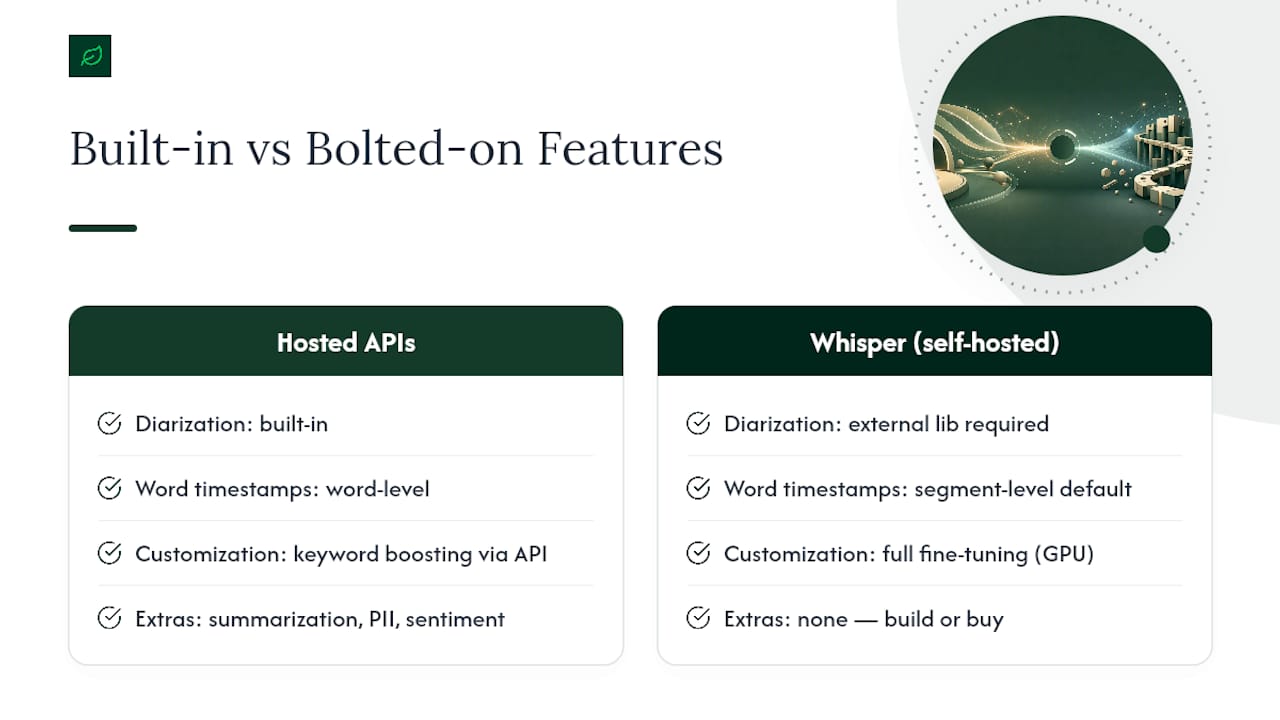
Customization splits along a predictable line. Hosted APIs typically offer keyword boosting or custom vocabulary lists you configure through the API itself, no retraining needed. Self-hosted Whisper gives you the deeper option: full fine-tuning on domain audio, at the cost of needing GPU infrastructure and ML engineering time you may not have budgeted for.
Audio intelligence extras, summarization, PII redaction, sentiment tagging, are increasingly bundled into hosted conversational APIs as add-on endpoints rather than separate products. Whisper ships none of this; you’re building or buying that layer separately if you self-host.
Vendor documentation on both sides tends to emphasize the scenario each product was built for. Deepgram’s own comparison content stresses low-latency, production-grade streaming performance for conversational audio, which is a real strength but also, unsurprisingly, the exact use case the product was designed to win.
OpenAI’s own guidance is worth following closely here: it recommends gpt-transcribe for general-purpose transcription and reserves whisper-1 specifically for translation or subtitle workflows where non-English output is acceptable, and flags a 224-token prompt limit on whisper-1 that catches teams off guard.
What Do These Routes Actually Cost at Scale?
Pricing shapes differ in a way that changes your decision entirely once volume climbs. Hosted streaming APIs typically bill per minute of audio processed. Hosted batch APIs often bill per hour, sometimes with a lower rate than streaming since there’s no real-time infrastructure overhead. Self-hosting flips the model: you pay a fixed GPU compute cost regardless of how many hours you push through it, so your per-hour cost drops as volume rises.
Here’s how that plays out across three volume tiers. These are illustrative calculations based on typical per-minute and per-hour pricing shapes; check current rates before budgeting, since providers adjust pricing regularly.
- 100 hours of audio per month: at this volume, hosted APIs almost always win. The GPU idle time on a self-hosted setup costs more than the API fees, and you avoid any DevOps overhead.
- 1,000 hours per month: this is the crossover zone. Depending on your GPU choice and utilization rate, a self-hosted Whisper deployment running near-continuously can start approaching cost parity with hosted API fees, but only if you’re also running near 24/7 utilization to justify the fixed compute spend.
- 10,000 hours per month: self-hosting typically pulls ahead here. A dedicated GPU instance running continuously amortizes down to a fraction of the per-hour cost hosted APIs charge at that volume, assuming your team can handle the ops burden of uptime, scaling, and model updates.
| Volume Tier | Hosted API Cost Behavior | Self-Hosted Cost Behavior |
|---|---|---|
| 100 hours/month | Low total spend, no infrastructure risk | GPU sits mostly idle, poor cost efficiency |
| 1,000 hours/month | Moderate spend, scales linearly with usage | Approaches parity if utilization stays high |
| 10,000 hours/month | High cumulative spend at per-minute rates | Fixed cost amortizes down, typically cheaper per hour |
Before you run these numbers for your own workload, check the current published pricing pages directly, since per-minute rates shift and volume discounts vary by contract tier. Watch for the costs that don’t show up in the headline rate: diarization is frequently an add-on fee, custom vocabulary or domain adaptation sometimes carries a separate charge, and outbound bandwidth for streaming large audio volumes adds up faster than teams expect. Alternate vendors in this space, like Speechmatics, market broader included language coverage and bundled diarization as a way to undercut per-feature add-on pricing, which is worth knowing even if you don’t end up choosing that route.
Teams that pick self-hosting too early absorb ops costs they didn’t need yet; teams that stay on hosted APIs too long overpay once volume triples.*
Building the Integration: SDKs, Protocols, and Common Pitfalls
Developer experience differs less than the marketing suggests, but the details matter once you’re debugging a production issue at 2 a.m.
Hosted low-latency APIs typically ship official SDKs for Python, Node.js, and Go, with WebSocket as the standard streaming protocol; some also support gRPC for lower-overhead server-to-server integrations. Whisper’s hosted API follows a standard REST pattern for batch jobs, while self-hosted Whisper runs through Python bindings directly, with WebRTC or a custom WebSocket layer if you’re building your own streaming wrapper on top of a model that wasn’t designed for streaming in the first place.
A near-real-time transcription pipeline generally follows this pattern: capture audio from the source, chunk it into small segments, stream those chunks over a persistent connection, receive partial results as the model processes, then finalize the transcript once the speaker pauses or the stream ends. A batch pipeline looks different: upload the file, create a job, poll or wait for a callback, then post-process the output into your target format.
Common integration pitfalls worth planning around:
- Partial result merging: streaming APIs revise earlier partial transcripts as more audio arrives; naive concatenation duplicates words.
- Punctuation normalization: different models punctuate differently, which breaks downstream NLP if you’re not normalizing output first.
- Transcript formatting drift: SRT and VTT export logic needs testing against edge cases like overlapping speech and very short utterances.
- Retry and backoff logic: streaming connections drop; your client needs to reconnect without losing buffered audio.
A minimal integration test should assert three things before you ship: end-to-end latency stays under your target threshold, the final transcript’s WER on a known clip meets your acceptance bar, and the output format (JSON, SRT, VTT) parses cleanly downstream. Skipping any one of these is how teams discover format bugs in production instead of in CI.
Comparative technical evaluation is a muscle worth building regardless of which APIs you’re testing. Cannatract’s own breakdown of evaluating platforms like HubSpot against Salesforce follows the same discipline: define the acceptance criteria first, test with your own data, then decide.
How Do These Routes Handle Data Privacy and Compliance?
Data handling policy is where “which API is better” turns into “which API is legally usable for this project.”
Hosted APIs typically default to retaining audio and transcripts for some window unless you configure a zero-retention or opt-out setting; always confirm the current retention policy directly with the vendor’s documentation before processing regulated data, since these policies change. Some vendors also offer customer-managed keys or dedicated on-prem endpoints for teams that can’t accept default retention terms at all.
Three certifications come up repeatedly in vendor evaluations, and each matters for a different reason:
- SOC 2 signals the vendor has audited controls around security operations, relevant to nearly any B2B integration handling customer data.
- HIPAA compliance (or a signed Business Associate Agreement) is non-negotiable if you’re transcribing any healthcare-related audio, patient calls included.
- ISO 27001 indicates a broader information security management system, often what enterprise procurement teams require before they’ll approve a vendor at all.
Self-hosting or running an air-gapped deployment removes the third-party data exposure question entirely, since audio never leaves your infrastructure. The trade-off is real: you take on latency tuning, model updates, and uptime maintenance that a hosted vendor otherwise handles for you.
| Requirement | Hosted API Fit | Self-Hosted Fit |
|---|---|---|
| HIPAA-covered audio | Requires signed BAA and verified retention settings | Full control, no third-party data exposure |
| SOC 2 / ISO 27001 procurement gate | Check vendor’s current certification status | Compliance burden shifts to your own infrastructure |
| Air-gapped requirement | Not possible with hosted APIs | Native fit, if ops team can support it |
If your legal or compliance team requires audio to never leave your network, that single constraint eliminates every hosted option regardless of accuracy or price. This article offers general technical guidance, not legal advice; confirm compliance requirements for regulated audio with your own counsel or compliance team before choosing a deployment route.
Which Route Should You Actually Test First?
Start with the constraint that can’t bend. If your compliance team requires audio to stay on your own infrastructure, self-hosting is your only option, full stop, regardless of what the accuracy numbers say. Everyone else should run through this checklist:
- Latency target: sub-second response needed? Lean hosted low-latency API.
- Language coverage: audio spans more than 10 to 15 languages? Lean toward a Whisper-based route.
- Ops budget: no dedicated ML or DevOps capacity? Hosted APIs remove that burden entirely.
- Monthly audio volume: under roughly 500 hours, hosted almost always wins on total cost; above a few thousand hours, self-hosting starts making financial sense.
Ask your team these questions before committing to a direction:
- What percentage of our audio is non-English, and how many distinct languages does it span?
- What’s our actual tolerance for maintaining GPU infrastructure long term, not just standing it up once?
- Do we need diarization, subtitle export, or audio intelligence features out of the box, or are we building those ourselves regardless?
Pro Tip: Set your acceptance thresholds before you test, not after you see results. A common working target is WER under 10% on your representative test set and p95 latency under 800 milliseconds for streaming use cases, but adjust both to what your actual product tolerates.
How to Benchmark These Systems Yourself
Every benchmark cited in this article, including the vendor ones, was measured on someone else’s audio. Yours is different, so build your own test before you sign a contract.
- Collect 30 to 50 audio clips spanning five categories: clean studio, phone-quality, noisy background, accented speech, and domain jargon.
- Transcribe every clip through each candidate using identical settings (same sample rate, same language hint, same model version).
- Score each transcript against a human-verified reference transcript to calculate WER per category, not just an overall average.
- Log RTF for batch jobs and latency percentiles (p50, p95, p99) for streaming jobs across at least 20 runs per candidate.
- Break down errors into substitutions, insertions, and deletions to spot systematic issues, like a model consistently mishearing a specific product name.
Pro Tip: Log environment metadata with every test run, sample rate, network conditions, model version string, and timestamp. Six months from now, when a vendor updates their model silently, that metadata is the only way you’ll know why your numbers shifted.
| Test Category | What It Reveals | Typical Failure Mode If Skipped |
|---|---|---|
| Clean studio audio | Baseline accuracy ceiling | Overestimating real-world performance |
| Noisy phone audio | Real production error rate | Surprise WER spike after launch |
| Accented speech | Fairness and coverage gaps | Silent bias against user segments |
| Domain jargon | Custom vocab effectiveness | Repeated mistranscription of key terms |
Evaluation frameworks consistently recommend this same discipline: test with identical audio across candidates, measure latency from the end of speech to usable text, and compare full WER distributions instead of a single headline number.
The Bottom Line on Deepgram vs Whisper
The verdict holds from the top of this article: pick a hosted low-latency API when you need fast, accurate English streaming transcription with minimal ops overhead, and pick a Whisper-based route, hosted or self-hosted, when your workload is multilingual, batch-oriented, or big enough that amortized compute beats per-minute pricing. Most teams aren’t choosing based on which model is “better” in the abstract. They’re choosing based on which trade-off, speed and simplicity versus language breadth and cost control, matches their actual constraints.
Before you commit to either:
- Build a 30 to 50 clip representative test set covering your real audio conditions.
- Run both a hosted API test and a self-hosted cost calculation side by side.
- Set your acceptance threshold in advance, a WER target and a latency target, so results decide, not gut feel.
Success looks like a specific number, not a vibe: a WER under your chosen threshold on your own jargon-heavy audio, and a p95 latency that fits your product’s actual response window.
Why Vendor Benchmarks Rarely Match Your Production Numbers
Every benchmark in this article, including the ones from Deepgram and OpenAI themselves, was measured under conditions the vendor chose. That’s not dishonest, it’s just how benchmarking works. The problem is that engineering teams routinely treat a vendor’s clean-dataset WER number as a prediction of what they’ll see on their own noisy, accented, jargon-heavy audio, and the gap between those two numbers is often the entire ballgame.
What’s underrated in this space is how much the ranking flips depending on what you feed the model. Whisper can lead on a multilingual clean-audio benchmark and then underperform badly on a noisy call-center recording where a hosted, conversation-tuned API pulls ahead. Neither result is wrong. They’re both true, for different audio. That’s exactly why representative testing matters more than picking the API with the better-looking chart on its landing page.
The teams that get this right treat evaluation as a first-class engineering task, not a five-minute API call before a demo. That’s the same discipline Cannatract applies when building voice-integrated automation for clients: instrument the pipeline early, measure against real production audio, and let the numbers, not the sales page, decide the architecture. A short, well-instrumented evaluation almost always costs less than migrating off the wrong choice six months into a contract.
Need Help Running the Evaluation or Shipping the Integration?
If you’d rather skip the weeks of benchmarking and integration debugging and get straight to a working system, that’s the exact problem Cannatract solves for teams building voice and transcription features into their product.
Cannatract designs and ships custom AI agents and automation systems, voice-integrated workflows included, with a fixed quote up front and a working system delivered in 2 to 4 weeks. That means no open-ended discovery phase and no guessing what the final invoice looks like. If your team needs a proof of concept built around Deepgram, Whisper, or a self-hosted route, Cannatract’s AI automation and agent development services cover the evaluation, the integration, and the ongoing operation once it’s live. Teams that need the web or client-facing layer built around the transcription pipeline can also lean on Cannatract’s web development and integration work to connect the API output into a working product end to end. Book a free automation audit to scope your specific workload and get a fixed quote before you commit engineering hours to either route.
Where to Dig Deeper
- The 1,000+ hour Whisper vs Deepgram performance test: use this for real comparative RTF and WER values across a large audio sample.
- The PMC benchmarking methodology article: use this for peer-reviewed guidance on why clean-dataset WER misleads and how to build a fair test corpus.
- The 2026 transcription API comparison from VexaScribe: use this for current benchmark values across English streaming and multilingual batch scenarios.
- The Deepgram vs Whisper evaluation guide from OpenTypeless: use this for a practical framework on measuring end-to-end latency and comparing WER distributions.
Sources
- PMC article on benchmarking methods and the limits of standard datasets
- Johal
- Best Transcription API 2026: Deepgram, AssemblyAI, Whisper | VexaScribe
FAQ
Is Deepgram Better Than Whisper?
Neither wins outright. Deepgram tends to lead on English streaming latency and conversational accuracy, while Whisper-based routes lead on multilingual batch coverage across roughly 98 languages.
How Much Does Deepgram Cost?
Deepgram bills on a per-minute basis for its hosted API, with rates varying by model tier and features like diarization; check the current pricing page directly, since rates change and volume tiers affect the final cost.
What Is Better Than Whisper?
For real-time English transcription, a hosted low-latency API like Deepgram often outperforms Whisper on latency and streaming accuracy; for general-purpose transcription, OpenAI itself now recommends gpt-transcribe over whisper-1.
Is Deepgram a Legitimate Company?
Yes. Deepgram is an established speech recognition API provider with published documentation, benchmark data, and enterprise customers, and it’s widely cited in independent 2026 transcription benchmarks alongside Whisper and other providers.
Should I Self-Host Whisper or Use a Hosted API?
Self-hosting makes financial sense once your monthly audio volume climbs into the thousands of hours and you can sustain near-continuous GPU utilization; below that, a hosted API is usually cheaper and far less operational work.