Accounts receivable automation uses software, rules, and AI to run invoicing, payment matching, collections outreach, and dispute routing without manual chasing. The immediate outcome is fewer days between invoice and cash: platforms tied to ERP systems like Oracle NetSuite or Microsoft Dynamics 365 automate cash application, flag disputes early, and sequence collections calls before an account goes cold.
Fewer than 30% of organizations have fully automated their collections processes as of late 2025, which means most finance teams are still leaving cash on the table through manual, semi-manual workflows.
If you’re weighing this now, skip the research spiral. Start here:
- Run a baseline DSO measurement using your last two quarters of billing and collection data.
- Map which invoices go touchless (auto-matched) versus which need a human today.
- Identify your top three collections bottlenecks before shopping vendors.
Key Takeaways
Accounts receivable automation reduces DSO and frees cash by automating invoicing, cash application, collections, and dispute routing across your ERP and payment systems.
| Point | Details |
|---|---|
| Fix data before dunning | Clean invoice and remittance data before automating collections cadence to avoid confused, inaccurate outreach. |
| Track the right KPIs | Monitor DSO, touchless match rate, and dispute rate to measure whether automation is actually working. |
| Configure collections deliberately | Use process hierarchies, pre-dunning, and quiet days to balance contact frequency with customer experience. |
| Vet vendors on evidence | Require sandbox testing and case studies with quantified DSO results before signing any contract. |
| Consider custom builds for complexity | Cannatract designs AR automation around multi-ERP or high-dispute environments that off-the-shelf platforms can’t map to directly. |
Table of Contents
- What Is Accounts Receivable Automation?
- How Does Automation Change Daily AR Work?
- What Systems Does AR Automation Require?
- What Business Results Should You Expect?
- How Do You Roll Out AR Automation?
- How Should You Configure Collections Automation?
- What Can Go Wrong With AR Automation?
- What Should You Ask AR Automation Vendors?
- When Does Off-the-Shelf Software Fall Short?
- Where Else Does AI Add Value in AR?
- How Cannatract Builds Custom AR Automation Systems
- Sources
- FAQ
What Is Accounts Receivable Automation?
Accounts receivable automation covers six connected workflows, not one feature. Each has a distinct owner and a distinct payoff.
- Invoicing and billing — invoices generate automatically from order or contract triggers, with delivery timed to customer preference (email, portal, EDI).
- Payment capture and cash application — incoming payments match to open invoices using remittance data, reference numbers, or AI-based pattern recognition.
- Collections and dunning — reminder sequences, calls, and escalation paths run on a schedule tied to invoice age and account risk.
- Credit management — credit limits and terms adjust based on payment history and risk scoring.
- Dispute and deduction handling — short-paid or contested invoices route to the right team automatically instead of sitting in a shared inbox.
- AR forecasting and reporting — cash-in projections update in real time instead of through a manual spreadsheet rebuild each Friday.
A collector or credit analyst still needs to own escalated disputes, judgment calls on write-offs, and any account where the customer relationship outweighs the invoice math.
How Does Automation Change Daily AR Work?
Each workflow has its own automation pattern, and they don’t all move the needle equally.
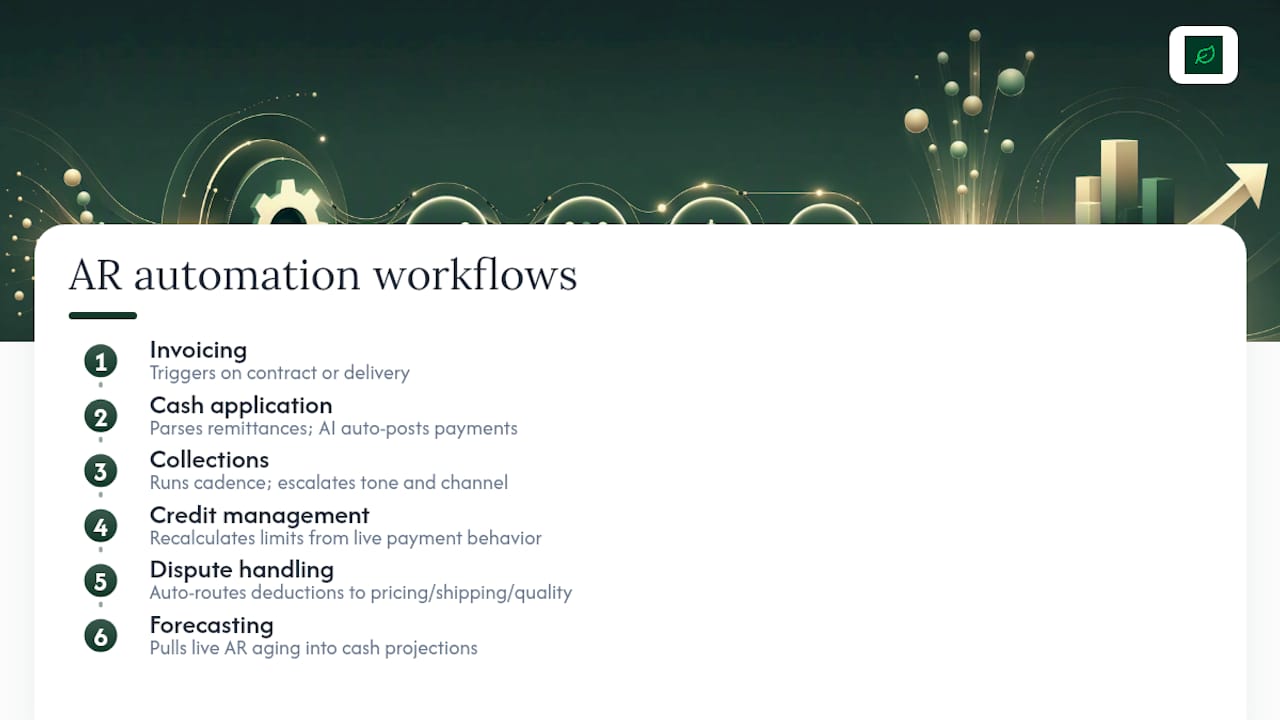
Invoicing automates on contract or delivery triggers, cutting the time between fulfillment and bill-out from days to hours. Cash application uses remittance parsing and AI matching to auto-post payments that used to require someone opening a bank statement line by line. Collections runs on a cadence, escalating tone and channel as an invoice ages instead of waiting for someone to notice it’s overdue. Credit management recalculates limits from live payment behavior rather than an annual review. Dispute handling auto-routes deductions to the department that caused them (pricing, shipping, quality) instead of parking them in AR. Forecasting pulls live AR aging into cash projections instead of a static month-end export.

The operational effect compounds: less manual touch time, fewer keying errors, and cash recognized closer to the day it’s actually collected.
Pro Tip: Fix invoice accuracy and cash application first. Tightening your collections cadence on top of bad remittance matching just means faster, more accurate arguments with confused customers.
What Systems Does AR Automation Require?
A reliable AR automation stack needs real connections, not a single login screen. Before evaluating vendors, confirm what has to talk to what.
Integration checklist:
- ERP or general ledger (NetSuite, Dynamics 365, SAP, or similar)
- Payment processors and bank feeds for real-time settlement data
- Email and customer portal channels for invoice delivery and dispute intake
- Remittance sources, including EDI feeds and lockbox files
- CRM, when sales-held relationships affect collections tone
Data requirements that make or break matching accuracy:
- Invoice metadata (PO numbers, contract references, line-item detail)
- Remittance strings from bank files or customer payment portals
- Customer payment terms and historical behavior
- Unapplied cash records, which are usually where AR teams lose the most time
AI plays a specific, bounded role here, not a magic one. Payment-likelihood scoring predicts which invoices will pay late before they’re overdue. Remittance parsing reads unstructured payment data and matches it to open invoices. Smart dunning sequencing adjusts contact timing and channel by account risk instead of a flat 30/60/90 rule. Anomaly detection flags unusual payment patterns that suggest fraud or duplicate billing before they hit the ledger.
Security can’t be an afterthought given how much banking and payment data flows through this stack. Confirm PCI scope if the platform ever touches card data, check role-based data access controls, and ask any vendor for SOC 2 or ISO certification before you sign anything. Remittance and payment-rail costs also vary widely by country and method, which matters if you bill internationally and want customers to pay through the cheapest, fastest rail available to them.
What Business Results Should You Expect?
The metrics that matter tie directly to cash, not just efficiency.
- DSO (Days Sales Outstanding) = (Accounts Receivable ÷ Total Credit Sales) × Number of Days
- Touchless match rate = percentage of payments auto-applied without human review
- Dispute rate = percentage of invoices contested or short-paid
- Collector productivity = accounts worked per collector per day
Every day of DSO you shave off is a day of revenue that stops sitting parked in receivables and starts working as usable cash. Take a business billing $50 million annually: a five-day DSO reduction frees roughly $685,000 in cash, calculated as ($50M ÷ 365) × 5. That’s real working capital, not a productivity metric on a dashboard.
Early wins tend to show up fast. Fixing invoice accuracy and cash application often produces measurable DSO gains within one to two billing cycles, since you’re removing friction that was already there. Structural gains, like tightened credit terms or redesigned collections cadences, take longer, usually two to three quarters, because they depend on changed customer behavior rather than just cleaner data.
How Do You Roll Out AR Automation?
A rushed rollout is the fastest way to turn a promising system into a source of customer complaints. Here’s a realistic sequence.
- Discovery (2 to 3 weeks) — map current invoice-to-cash flow, identify manual touchpoints, and set baseline DSO and touchless match rate.
- Data cleanup (2 to 4 weeks) — validate customer master data, standardize payment terms, and clean historical remittance references so matching logic has something reliable to work with.
- Integration (3 to 6 weeks) — connect ERP, payment processors, and bank feeds; test data flows both directions before touching production invoices.
- Pilot (4 to 6 weeks) — run automation on a single customer segment or business unit; measure touchless match rate and dispute handling time against baseline.
- Scale and roll out (ongoing) — expand by segment, update customer-facing communications about new invoice or payment channels, and retire manual processes only after the automated ones prove out.
Checklist items worth confirming at each phase: PO and contract fields populated correctly, cash application test cases covering partial payments and short-pays, and customer notices sent ahead of any change to invoice format or payment channel.
Assign clear ownership: a finance leader owns outcomes and KPIs, IT owns integration and data security, a collections lead owns process configuration, and your vendor or implementation partner owns delivery against a defined scope. Before signing anything, get a written procurement checklist covering implementation SLAs, data ownership, and exit terms.
How Should You Configure Collections Automation?
Collections automation lives or dies on configuration, not the software’s feature list. Microsoft’s Dynamics 365 documentation on collections process automation lays out the pattern most enterprise platforms follow.
- Build a process hierarchy. Group customers into pools by risk tier, industry, or invoice size, then assign exactly one collections process per pool so accounts don’t get conflicting instructions.
- Set pre-dunning and quiet days. Send a friendly reminder before an invoice is even due, then configure quiet days so a customer who just paid doesn’t get hit with another reminder the next morning.
- Set exclusion thresholds. Exclude invoices below a minimum dollar amount from aggressive dunning; chasing a $40 balance with the same intensity as a $40,000 one wastes collector time and irritates customers.
- Build activity and email templates, then run a simulation before going live so you can see exactly what a customer would have received last month under the new rules.
Payment prediction models can trigger their own activities, flagging an account for early outreach before it’s even late.
Pro Tip: Always simulate a new collections process against last quarter’s real invoice data before flipping it on. Rules that look reasonable on paper sometimes generate ten reminders in a week for one customer.
What Can Go Wrong With AR Automation?
Every automation project carries real risk if you skip the guardrails.
- Poor invoice data breaks matching before it starts. Fix this with strict validation rules at invoice creation, not after.
- Over-aggressive dunning damages customer relationships. Segment by account value and risk so a strategic account doesn’t get the same cadence as a slow-paying small buyer.
- Reconciliation lag between AR and the general ledger causes reporting confusion. Auto-apply cash and sync ledgers daily, not weekly.
- Vendor lock-in limits your options later. Negotiate data portability and clear exit terms into the contract before you sign.
Stage your rollout with defined pilot KPIs and a rollback trigger. If touchless match rate doesn’t improve within the pilot window, pause and diagnose before scaling further.
What Should You Ask AR Automation Vendors?
Score vendors on the same dimensions every time, and don’t let a slick demo skip questions you’d ask any other software purchase.
Technical: Which ERP connectors are native versus custom-built? What remittance sources (EDI, lockbox, portal) does the platform ingest natively?
Security: Is the vendor SOC 2 or ISO certified? What’s the PCI scope if payment data passes through the platform?
Implementation: What’s the realistic timeline for your data volume and ERP? What touchless match rate improvement can they commit to in a sample SLA?
Commercial: Is pricing per seat, per transaction volume, or flat platform fee? What does year two cost after implementation discounts expire?
Vendor case studies claiming strong DSO or productivity gains deserve scrutiny, since outcomes vary by implementation and depend heavily on your own data quality and integration depth. Ask for a sandbox environment, run your own sample invoices through it, and require a proof-of-concept tied to a specific, measurable success metric before committing to a contract.
When Does Off-the-Shelf Software Fall Short?
Platforms like HighRadius, Oracle NetSuite, and Microsoft Dynamics 365 handle standard order-to-cash flows well. They struggle when your business runs multiple ERPs after an acquisition, processes high-volume complex remittances (construction draws, healthcare claims, multi-line deduction disputes), or needs a customer portal that doesn’t exist in any vendor’s roadmap.
That’s the gap custom automation fills. A defined-scope engagement typically moves from discovery to a working system in two to four weeks, connecting your actual ERP instances, payment processors, and customer communication channels instead of forcing your process into a vendor’s template.
Signs you’re in this category:
- More than one ERP or billing system feeding a single AR ledger
- Dispute volume high enough that generic routing rules create bottlenecks
- Remittance formats too varied for standard parsing templates to handle reliably
- A need for a client-facing payment portal that doesn’t exist in your current stack
AI’s role in these systems extends well past reminders and predictions.
Where Else Does AI Add Value in AR?
Anomaly detection is one of the more underused capabilities in AR automation, and it deserves more attention than it gets. Trained on historical payment and invoicing patterns, it flags transactions that deviate from a customer’s normal behavior: an invoice paid from an unfamiliar account, a remittance amount that doesn’t match any open invoice, or a sudden spike in credit memos from one customer.

That matters for fraud prevention specifically. Invoice fraud and payment redirection schemes often hide inside normal-looking transactions; a human reviewer scanning hundreds of payments a day won’t catch a subtle account-number change, but a model trained on transaction history will flag it immediately.
AI also strengthens dispute triage. Rather than routing every deduction to a generic queue, models can classify disputes by likely root cause (pricing error, shipping discrepancy, quality claim) based on historical resolution patterns, cutting the time a dispute sits unassigned.
Duplicate payment detection is a quieter but valuable use case: customers occasionally pay the same invoice twice, especially with automated AP systems on their end, and catching that before it becomes a refund request saves both sides friction.
None of this replaces human judgment on genuinely ambiguous cases. What it does is surface the right cases to the right person faster, instead of burying anomalies in a spreadsheet nobody reviews until month-end close.
First-Person Lessons From Building AR Automations
Start with touchless match improvements, not dunning. Fixing cash application first exposes real data problems before you layer collections logic on top of them. One recurring pattern: teams that automate collections before cleaning remittance data end up automating confusion, sending accurate-sounding reminders for invoices that were actually already paid. The fix is sequencing, always. Get matching right, then automate outreach.
How Cannatract Builds Custom AR Automation Systems
Off-the-shelf AR platforms work when your order-to-cash flow looks like everyone else’s. Cannatract exists for the businesses whose flow doesn’t: multiple ERPs, complex remittance formats, high dispute volume, or a customer portal that no vendor template accounts for. Instead of asking you to reshape your process around a platform’s defaults, Cannatract designs the automation around how your finance team actually works, connecting your ERP, payment processors, and customer communication channels into one system.
A typical engagement moves from discovery to a working system in two to four weeks for a clearly scoped problem, with a fixed quote before any build starts. That means faster cash application, fewer manual touches on collections, and a system your team owns rather than rents indefinitely.
If your AR process has outgrown what a standard vendor template can handle, book a free automation audit and find out what a custom-built system would actually look like for your order-to-cash flow.
Sources
- AR Automation Survey Report 2025
- Collections process automation - Dynamics 365 Finance | Microsoft Learn
- Remittance Prices Worldwide
FAQ
What Is Accounts Receivable Automation?
It’s the use of software and AI to automate invoicing, payment matching, collections outreach, and dispute routing so invoices get paid faster with less manual work.
How Much Can AR Automation Reduce DSO?
Early gains from fixing invoice accuracy and cash application often show up within one to two billing cycles, while structural gains from credit and collections changes typically take two to three quarters.
Do I Need an ERP Before Automating AR?
Not necessarily, but your automation needs to integrate with whatever system holds invoice, customer, and payment data, whether that’s an ERP like NetSuite or Dynamics 365 or a simpler billing tool.
What’s the Difference Between Off-the-Shelf Software and a Custom Build?
Off-the-shelf platforms fit standard order-to-cash flows; a custom build from a partner like Cannatract fits businesses with multiple ERPs, high dispute volume, or remittance formats standard templates can’t parse.
What Should I Check Before Signing an AR Automation Vendor?
Confirm SOC 2 or ISO certification, ask for a sandbox test with your own data, and require a proof-of-concept tied to a specific touchless match rate or DSO improvement target.